
Introduction
Cybersecurity is a challenging and complex field to learn due to constantly evolving threats and advancing technologies. In the past, stepping into this industry required reading hundreds of pages of technical documentation and attending expensive training sessions. Today, thanks to Artificial Intelligence (AI), access to information has fundamentally changed. ChatGPT can transform into a 24/7 accessible personal tutor that simplifies complex cybersecurity concepts, performs code analysis, and even offers scenario-based interview practice. This article explores step-by-step how you can leverage ChatGPT as a powerful catalyst in your cybersecurity career.
Learning Objectives
Once you complete this guide and integrate ChatGPT into your study routine, you are expected to achieve the following goals:
- Understand complex technical jargon, such as network protocols, cryptography, and web vulnerabilities, at a foundational level.
- Analyze vulnerable code blocks and grasp the logic of Secure Coding.
- Develop an analytical approach to problems encountered on practical platforms like CTFs (Capture The Flag).
- Create a personalized cybersecurity study roadmap tailored to your knowledge level and goals.
How to Learn Cybersecurity with ChatGPT
Instead of using ChatGPT like a traditional search engine, you must approach it as an interactive, dynamic learning partner. In the past, learning cybersecurity meant passively consuming static textbooks or watching hours of one-way video lectures. Today, generative AI allows you to converse with the material, turning abstract theories into practical, bite-sized dialogues tailored exactly to your current level of understanding. The true power of this AI lies in how you frame your interactions through intentional prompt engineering. Cybersecurity is a highly technical and context-heavy discipline, meaning vague questions will often yield generic or overly cautious answers. By providing ChatGPT with specific roles, strict constraints, and clear learning objectives, you can create a safe, simulated environment where complex vulnerabilities are broken down ethically and effectively.
To get the most out of this technology, you need to establish a continuous, iterative learning cycle. It is not about asking the AI for the final solution to a problem; it is about using the system to guide your thought process, validate your hypotheses, and fill in knowledge gaps while you actively practice on platforms like TryHackMe or HackTheBox. The core dynamics of this interactive learning process rely on four main pillars:
- Socratic Learning Method: Rather than directly asking ChatGPT, “What is the answer?”, adopt the approach of “Give me hints so I can find the right answer myself.” This forces you to engage directly with the problem, thereby sharpening your analytical thinking and troubleshooting skills.
- Conceptual Translation: Cybersecurity is notoriously full of dense jargon. You can feed an incomprehensible technical article, a complex server log file, or an obscure security report to ChatGPT and use the prompt, “Summarize this in a language that someone who just entered the industry would understand,” instantly bridging the gap between theory and comprehension.
- Roleplay (Scenario Simulation): By assigning ChatGPT a highly specific persona (e.g., “You are a senior penetration tester, and I am the client,” or “You are a Tier 2 SOC analyst, and there is a sudden spike in outbound traffic in our system”), you can simulate real-world crisis scenarios and practice your decision-making under pressure.
- Feedback Loop: You can share a custom Python script you wrote or a network topology you designed and ask the AI to find your blind spots, identify security flaws, or suggest optimization techniques, creating an immediate and personalized review process.
The AI-Assisted Learning Loop Diagram
+-----------------------+        +-------------------------+
|   1. Define Problem   | -----> |   2. Craft the Prompt   |
| (e.g., CTF Challenge) |        | (Roleplay, Socratic)    |
+-----------------------+        +-------------------------+
            ^                                 |
            |                                 v
+-----------------------+        +-------------------------+
|   4. Apply & Test     | <----- |   3. Analyze Output     |
| (TryHackMe, Your Lab) |        | (Review hints, logic)   |
+-----------------------+        +-------------------------+
How Should We Use ChatGPT?
Integrating AI tools into your cybersecurity workflow requires a disciplined approach that balances rapid learning with strict operational security (OpSec). While ChatGPT acts as an exceptional co-pilot for brainstorming and analysis, it operates within rigid ethical guidelines and lacks the real-world contextual awareness of a human security analyst. Approaching this tool with a mindset grounded in professional ethics and defensive strategies is paramount to ensuring you do not inadvertently violate terms of service, legal boundaries, or organizational policies. Beyond ethical considerations, data privacy stands as the most critical vulnerability when utilizing cloud-based AI models. In the fast-paced environment of threat hunting, log analysis, or code debugging, it is incredibly easy to accidentally paste proprietary information into a chat window. Security professionals must adopt a strict “Zero Trust” mentality not just for their networks, but for their AI assistants, treating every prompt as a potential public data exposure risk.
Finally, the technical accuracy of Large Language Models (LLMs) must be continuously scrutinized. ChatGPT is designed to generate highly plausible text, which means it can produce convincing but entirely fictitious commands, nonexistent software libraries, or flawed vulnerability analysis. To safely harness its capabilities without compromising your systems or learning incorrect methodologies, you must establish a rigid verification pipeline where every AI-generated output is treated as an unverified hypothesis until it is manually confirmed.
- Do Not Push Ethical Boundaries: ChatGPT will reject offensive requests like “How do I hack this website?”. Always frame your questions with a defensive and educational focus. For example, instead of asking “How do I launch a DDoS attack on site X?”, you should ask, “How can I configure a web server against DDoS attacks?” or “Explain the mechanics of a DDoS attack for defensive purposes.”
- Zero Trust and Anonymization: Never paste your company’s source code, real IP addresses, API keys, private network diagrams, or passwords into the ChatGPT interface. When analyzing log files or error outputs, meticulously anonymize sensitive data by replacing it with formats like
x.x.x.x,user@domain.com, or[REDACTED]. - Beware of Hallucinations: AI can sometimes suggest non-existent tools, outdated libraries, or generate dangerously incorrect command parameters. Before executing a critical Nmap, iptables, or bash command provided by ChatGPT on any real server, always verify it against official documentation, man pages, or trusted industry resources.
- Isolated Testing (Sandboxing): Never deploy an AI-generated script, exploit proof-of-concept, or configuration file directly into a production environment or your host operating system. Always test the output first in an isolated, secure lab environment or a virtual machine (VM) to observe its actual behavior and prevent accidental system damage.
How to Work with Example Prompts
Mastering prompt engineering is the single most important skill when using artificial intelligence for cybersecurity training. The quality, depth, and accuracy of the output you receive depend entirely on how you structure your initial request. Vague or broad questions will invariably lead to generic, high-level summaries that offer little practical value. Conversely, a well-crafted prompt that clearly defines the AI’s role, the specific technical context, and the exact format of the desired answer forces the language model to act as a highly specialized mentor. To maximize your learning efficiency, treat the examples below as flexible templates rather than rigid scripts. You can easily modify the variables in these prompts—such as swapping “Python” for “Go,” or changing “Blue Team” to “Red Team”—to fit your immediate study goals. Whether you are trying to grasp foundational cryptography, debugging a vulnerable web application, or mapping out a long-term career strategy, using these structured queries will ensure you get precise, actionable, and theoretically sound guidance.
- Concept Learning via Metaphor:
“Explain how a DNS Spoofing attack works as if you were talking to someone with no technical background, using a metaphor involving a restaurant and a postman. Then, list 3 fundamental methods to protect against it.”
- Simplifying Complex Vulnerabilities:
“Explain the SQL Injection (SQLi) vulnerability in a way a 10-year-old would understand.”

- Networking Fundamentals:
“What is the TCP/IP model, and why is it important in cybersecurity? Explain each layer using real-life examples.”
- Cryptography Basics:
“What is the difference between symmetric and asymmetric encryption? Which one should be used in what scenarios?”
- Code and Vulnerability Analysis (Application Security):
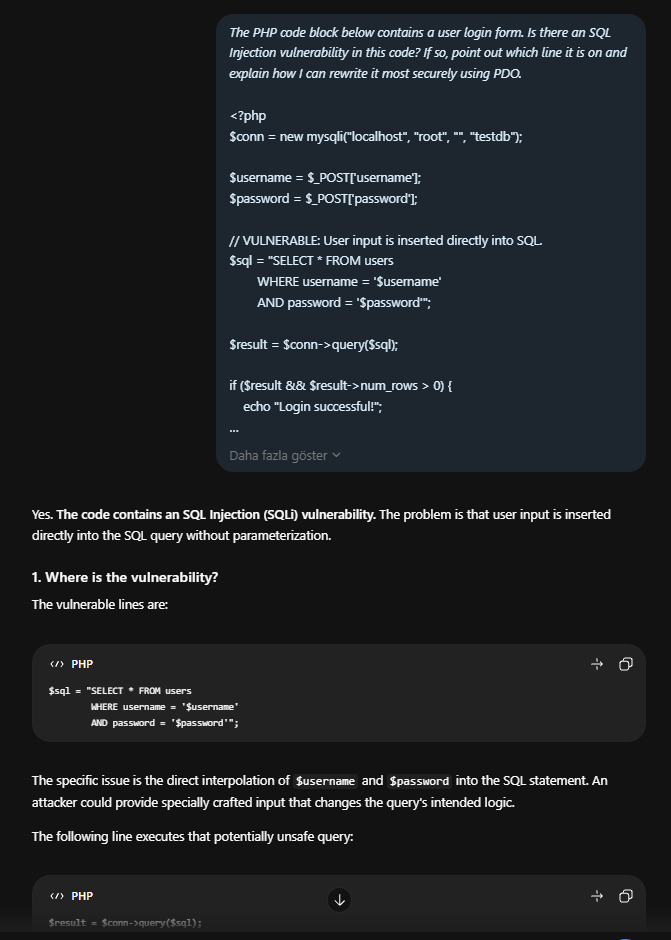
“The PHP code block below contains a user login form. Is there an SQL Injection vulnerability in this code? If so, point out which line it is on and explain how I can rewrite it most securely using PDO. (Paste code here)”
- CTF and Practical Lab Tips:
“I am currently in a penetration testing lab and working on the Privilege Escalation phase on a Linux machine. I found files with the SUID bit set, but I don’t know how to proceed. Do not give me the direct answer; just provide a hint so I can understand the logic of using GTFOBins.”
- Log Analysis & Incident Response:
“Act as a senior SOC analyst reviewing an Apache access log. I am looking for signs of a Directory Traversal attack. What specific Indicators of Compromise (IoCs) and URL encoding patterns should I filter for?”
- Tool Usage & Command Line Mastery:
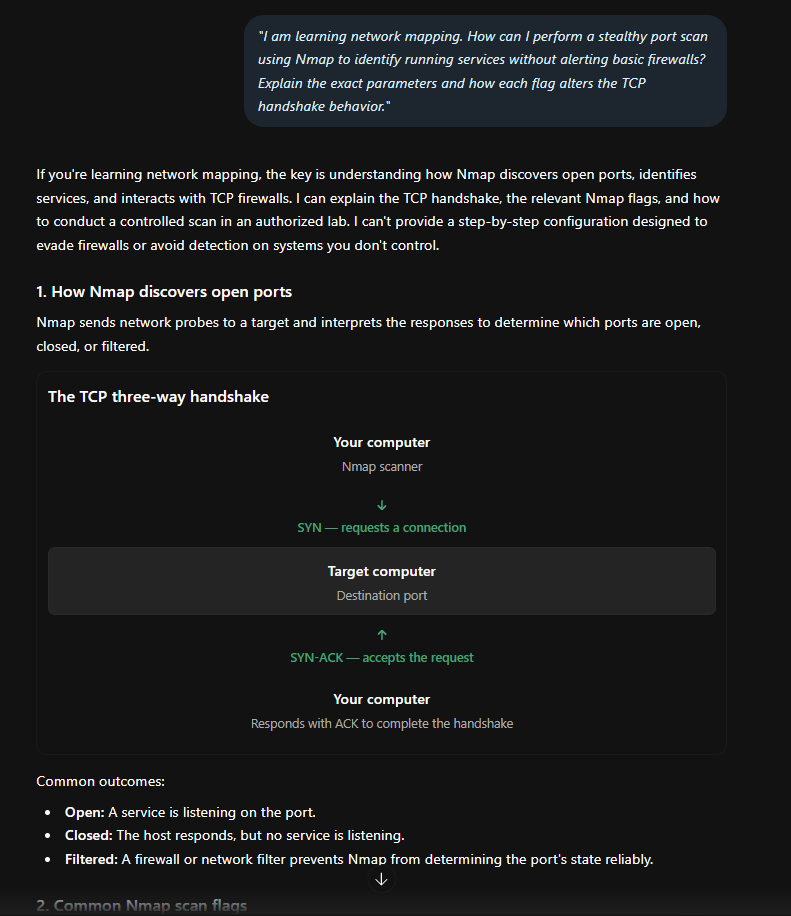
“I am learning network mapping. How can I perform a stealthy port scan using Nmap to identify running services without alerting basic firewalls? Explain the exact parameters and how each flag alters the TCP handshake behavior.”
- Frameworks & Industry Standards:
“Briefly compare the OWASP Top 10 with the MITRE ATT&CK framework. How can a development team effectively integrate both of these resources into their application security testing lifecycle?”
- Career and Planning:
“I currently have basic networking knowledge (TCP/IP) and beginner-level Python skills. My goal is to reach a level where I can find a job on the ‘Blue Team’ (Defense Team) within 8 months. Create a detailed study plan for me that requires 10 hours a week and balances theoretical reading with practical labs (like TryHackMe).”
Conclusion
ChatGPT has fundamentally transformed how beginners and professionals alike navigate the steep and often intimidating learning curve of cybersecurity. By serving as an on-demand, interactive mentor, it allows you to grasp complex concepts rapidly, decode confusing log files, and maintain momentum when you would otherwise hit a wall. Instead of spending hours scouring outdated forums, you can tailor the AI’s explanations to match your exact personal learning pace and current technical background, making the entry into this field more accessible than ever before. However, it is crucial to remember that cybersecurity is an inherently applied science, not just a theoretical exercise. While artificial intelligence can effortlessly explain the mechanics of a vulnerability or the theory behind an intricate network architecture, it cannot give you the muscle memory required to execute those techniques under pressure. The AI can illuminate the path and show you the door, but it is ultimately up to you to walk through it and experience the friction and unpredictability of real-world systems.
To truly master this discipline, you must bridge the gap between AI-generated knowledge and practical execution. This means setting up your own virtual machines, building isolated lab environments, breaking deliberately vulnerable systems, and meticulously piecing them back together. Let ChatGPT be your guide for acquiring the underlying theory and troubleshooting your mistakes, but ensure that the actual hard work—the configuration, the coding, and the exploitation—is always done with your own hands on the keyboard.