
Introduction
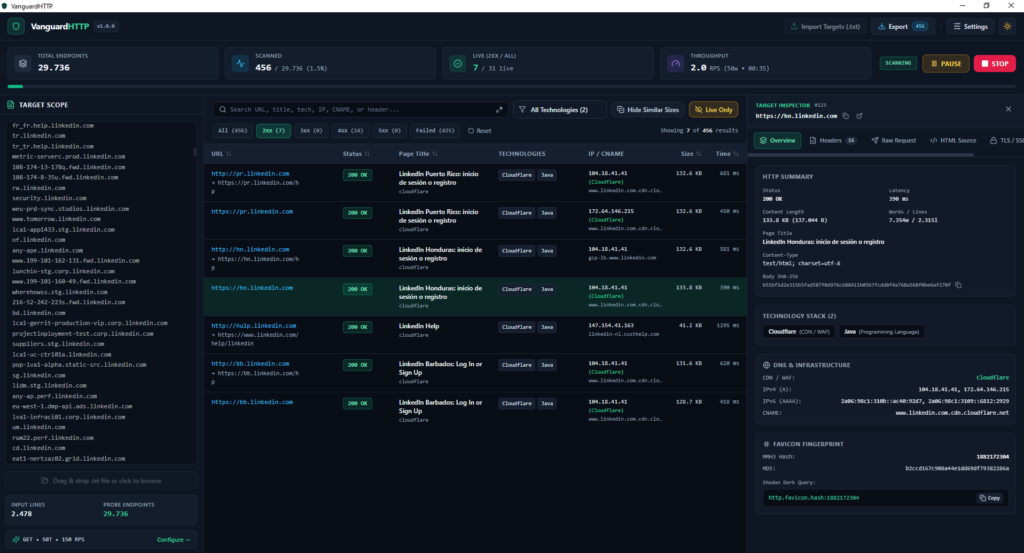
Modern attack-surface discovery and web reconnaissance have evolved dramatically over the past few years. Whether you are conducting an external penetration test, executing a red team engagement, or hunting for vulnerabilities in a large-scope bug bounty program, reconnaissance almost always begins with massive lists of candidate assets—thousands of subdomains gathered from certificate transparency logs, IP ranges allocated to an organization, and non-standard TCP ports uncovered during infrastructure enumeration. Traditionally, security researchers process these target lists by chaining together multiple command-line utilities, piping outputs across separate tools for HTTP probing, TLS inspection, technology detection, and screenshot or header parsing. While CLI tools excel at raw automation, working purely in the terminal introduces significant friction during manual analysis. Analysts often find themselves writing throwaway jq or Python scripts just to filter out noisy wildcard responses, struggling to pause or adjust rate limits mid-scan without losing state, or switching between multiple browser tabs and utilities to inspect raw HTTP headers, SSL/TLS certificates, and Shodan favicon hashes.
VanguardHTTP was built to eliminate that friction. By combining the raw concurrency and network performance of Go with a responsive, native desktop interface powered by Wails v2, VanguardHTTP bridges the gap between high-speed command-line probing and interactive visual triage. Packaged as a single standalone binary with minimal memory overhead, it provides security professionals with a unified workspace to probe, fingerprint, filter, and report on web assets in real time.
Learning Objectives
By the end of this article, you will be able to:
- Understand the core problem VanguardHTTP solves in modern reconnaissance and attack-surface management workflows.
- Explain how Go’s worker-pool concurrency model, token-bucket rate limiting, and Wails v2 inter-process communication (IPC) enable smooth, high-RPS desktop scanning.
- Explore VanguardHTTP’s deep fingerprinting engine, including offline technology detection, DNS/CDN attribution, X.509/TLS certificate inspection, and Shodan-compatible favicon hashing.
- Integrate VanguardHTTP into an offensive security pipeline alongside tools like Burp Suite, OWASP ZAP, Nuclei, ffuf, and Shodan.
- Download pre-built releases or compile VanguardHTTP from source on Windows, macOS, and Linux, and learn how to contribute to the open-source repository.
What is the VanguardHTTP Project?
VanguardHTTP is an open-source, cross-platform HTTP probing and deep fingerprinting desktop suite developed by security researcher Halil İbrahim Deniz and released under the MIT License. Designed specifically for penetration testers, bug bounty hunters, red team operators, and security researchers, it transforms raw target lists into structured, filterable security intelligence. A defining architectural choice behind VanguardHTTP is its technology stack: Go (1.22+) on the backend and Wails v2 for the desktop shell. Many modern cross-platform security tools rely on Electron, which bundles an entire Chromium browser instance and Node.js runtime—frequently consuming hundreds of megabytes of RAM before a single packet is sent. In contrast, Wails v2 binds a compiled Go backend directly to the operating system’s native webview engine.
This design yields several practical advantages for security practitioners:
- Single Standalone Binary: Everything—including the frontend assets and embedded fingerprinting rules—compiles into one portable executable with zero external runtime dependencies.
- Minimal RAM Overhead: Lightweight native execution leaves system resources free for concurrent network sockets and heavy target lists.
- True Cross-Platform Parity: Runs natively across Windows, macOS, and Linux with consistent behavior and dark/light UI themes.
How Does VanguardHTTP Work?
Under the hood, VanguardHTTP is engineered as a multi-stage reconnaissance pipeline where a concurrent Go scanning engine communicates asynchronously with an event-driven user interface:
- Target Ingestion, Deduplication, and Expansion: Before any network packets leave the host, VanguardHTTP normalizes user-supplied inputs. Whether targets are pasted directly into the workspace or imported from files, the engine automatically deduplicates entries, expands IPv4/IPv6 CIDR blocks into individual host addresses, pairs hosts with custom TCP port lists, and previews the exact endpoint count prior to execution.
- Dynamic Worker Pool & Token-Bucket Rate Limiting: During active probing, tasks are distributed across a configurable Go worker pool capable of scaling from 1 up to 1,000 concurrent worker threads. High concurrency without traffic shaping can quickly trigger Web Application Firewall (WAF) blocks or overwhelm fragile staging servers. To prevent this, VanguardHTTP incorporates a precision token-bucket rate limiter (
golang.org/x/time/rate) that enforces an exact Requests Per Second (RPS) ceiling across all active workers. - Safe Mid-Flight Lifecycle Control: Real-world assessments rarely run uninterrupted. VanguardHTTP implements synchronized state management that allows operators to Start, Pause, Resume, and Stop live scans on the fly without causing goroutine deadlocks, corrupting partial results, or leaking open TCP connections.
- Micro-Batched IPC Streaming: Streaming thousands of individual probe results per second directly into a graphical table can bottleneck UI rendering. VanguardHTTP solves this by emitting telemetry from Go to the frontend via Wails Events (
runtime.EventsEmit) using micro-batched UI updates. Even at high RPS rates, table scrolling, search queries, and row inspection remain responsive. - Offline Fingerprinting via
go:embed: Rather than relying on external cloud APIs that leak target reconnaissance data to third parties, VanguardHTTP embeds a Wappalyzer-style JSON detection ruleset directly inside the binary at compile time (go:embed), enabling fast, private, and offline technology identification.
Key Features of VanguardHTTP
1. Smart Target & Protocol Discovery
- Automatic Scheme Probing & Fallback: Bare domain names and IP addresses rarely specify whether they serve encrypted or plaintext traffic. VanguardHTTP automatically probes
https://first and seamlessly falls back tohttp://if TLS negotiation fails—or probes both schemes concurrently when complete coverage is needed. - CIDR Block Expansion: Paste network ranges such as
192.168.1.0/24(IPv4 or IPv6), and VanguardHTTP automatically expands the subnet into individual host targets ready for probing. - Custom TCP Port Lists & Presets: Move beyond default ports (
80and443) by selecting built-in web port presets (8080,8443,3000,8000, etc.) or defining custom TCP port lists to uncover administrative interfaces and shadow services. - Drag-and-Drop Target Import: Quickly load
.txt,.lst, or.csvfiles directly into the interface with automatic deduplication and live endpoint counting.
2. Comprehensive Deep Fingerprinting Engine
- Rich HTTP Telemetry & Metrics: Every probed endpoint returns color-coded HTTP status badges (
2xx,3xx,4xx,5xx), extracted<title>tags,ServerandX-Powered-Byheaders, content length, word and line counts, SHA-256 response body hashes, and exact response latency in milliseconds (ms). - Technology Stack & WAF Detection: Using its embedded Wappalyzer-compatible JSON ruleset, VanguardHTTP identifies web servers, content management systems (CMS), frontend and backend frameworks, reverse proxies, CDNs, WAFs, and DevOps panels—extracting version numbers whenever exposed.
- Concurrent DNS & Infrastructure Attribution: Performs parallel
A,AAAA, andCNAMEDNS lookups alongside automatic CDN and WAF provider attribution so analysts can immediately distinguish origin servers from edge networks. - X.509 / TLS Certificate Inspection: Inspects the cryptographic posture of every HTTPS endpoint, extracting the TLS protocol version, negotiated cipher suite, Subject Common Name (CN), Certificate Authority (Issuer), validity dates, expiration countdown, self-signed status, and all Subject Alternative Names (SANs)—often revealing additional internal or sibling domains.
- Shodan-Compatible Favicon Hashing: Computes RFC-2045 Base64 MurmurHash3 (
MMH3) and MD5 digests for/favicon.icoand HTML-declared icon links. VanguardHTTP automatically formats these values into ready-to-copyhttp.favicon.hash:<id>queries, making it effortless to pivot to Shodan to uncover related infrastructure or origin IPs bypassing a CDN.
3. Advanced Request Customization & Proxy Routing
- Full HTTP Method & Payload Support: Send
GET,HEAD,POST,OPTIONS,PUT,PATCH, orDELETErequests with custom request bodies to test API endpoints or specific routes. - Custom Headers & User-Agent Rotation: Inject arbitrary headers—such as
Authorizationbearer tokens, sessionCookievalues, or program-requiredX-Bug-Bountyidentification headers—and toggle between a fixed custom User-Agent string or an automated multi-browser User-Agent rotation pool. - Seamless Proxy Integration: Route VanguardHTTP traffic through
HTTP,HTTPS,SOCKS5, orSOCKS5Hproxies to inspect interesting endpoints directly inside Burp Suite or OWASP ZAP. - Redirect Chain Tracking: Configure redirect-following behavior while logging every intermediate hop’s HTTP status code and
Locationheader.
4. Interactive GUI, Noise Reduction & Multi-Format Reporting
- Dark & Light Mode: Built with a high-contrast cyber-security Dark Mode by default for extended recon sessions, paired with an instant Light Mode switch.
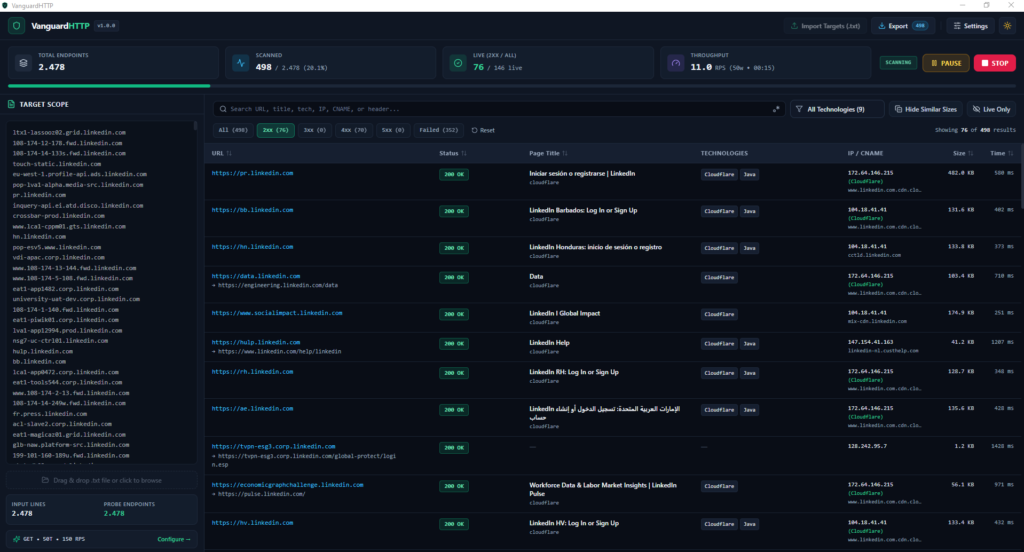
- Advanced Filtering & “Hide Similar Sizes”: Large subdomain scans often return hundreds of identical wildcard pages, parked domains, or default WAF error templates. VanguardHTTP allows instant filtering by status code category, detected technology, or keyword/Regex search, while the “Hide Similar Sizes” toggle collapses duplicate responses to surface unique attack surfaces immediately.
- Target Inspector Drawer: Clicking any row opens a comprehensive side drawer containing the Raw HTTP Request, Raw & Parsed Response Headers, HTML Source Preview, SSL/TLS Certificate Details, and the full Redirect Chain.
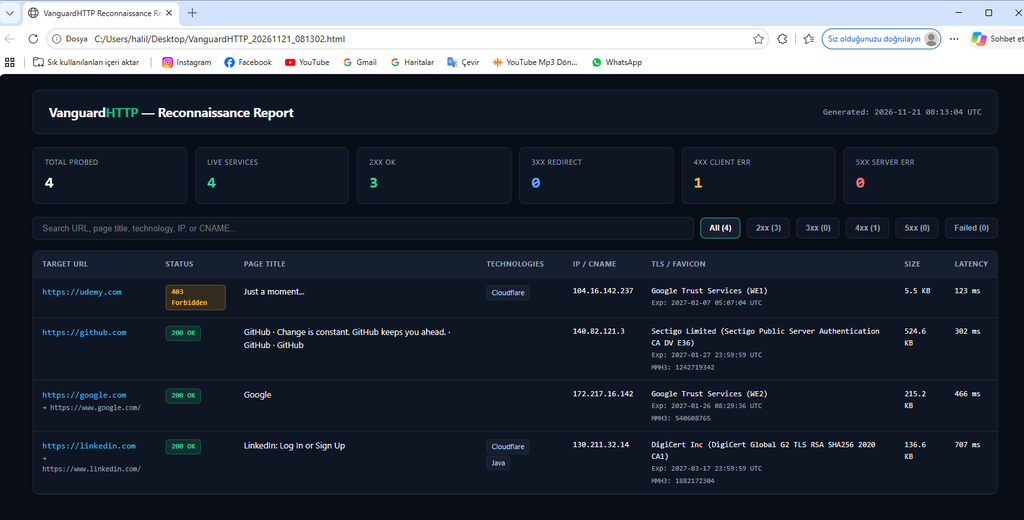
- Multi-Format Export: Export either your entire dataset or a filtered subset into JSON (for programmatic pipelines), CSV (with UTF-8 BOM for clean spreadsheet analysis), TXT (a clean list of live URLs ready to pipe directly into
nucleiorffuf), or a standalone interactive HTML Security Report suitable for sharing with stakeholders or clients.
Downloading VanguardHTTP from GitHub
You can get started with VanguardHTTP in minutes either by downloading a pre-compiled release binary or by building the project directly from source.
Option 1: Download Pre-Built Binaries
- Visit the official GitHub repository at github.com/HalilDeniz/VanguardHTTP.
- Navigate to the Releases page
https://github.com/HalilDeniz/VanguardHTTP/releases - Download the standalone binary archive matching your operating system (Windows, macOS, or Linux), extract it, and run the executable directly.
Option 2: Build from Source
To compile VanguardHTTP yourself, ensure that Go 1.22+, Node.js 18+ (LTS), and the Wails CLI v2 are installed on your machine:
go install github.com/wailsapp/wails/v2/cmd/wails@latest
wails doctor
Clone the repository and download the Go module dependencies:
git clone https://github.com/HalilDeniz/VanguardHTTP.git
cd VanguardHTTP
go mod tidy
To launch the application in live-reloading development mode:
wails dev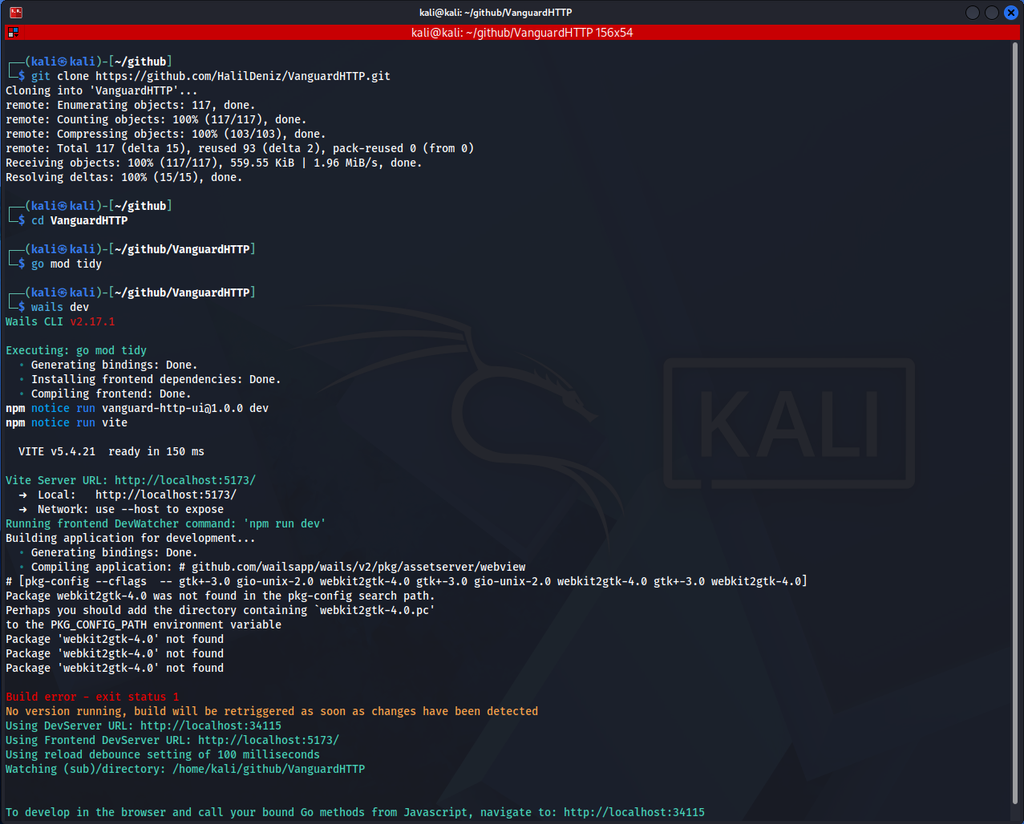
To compile optimized production binaries for your target platform:
- Windows (
amd64):
wails build -clean -platform windows/amd64 -ldflags "-s -w"Output: build/bin/VanguardHTTP.exe
- macOS (
universal):
wails build -clean -platform darwin/universal -ldflags "-s -w"Output: build/bin/VanguardHTTP.app
- Linux (
amd64— Debian, Ubuntu 24.04+, Kali): First install the required GTK3 and WebKit2GTK development packages:
sudo apt update && sudo apt install -y build-essential libgtk-3-dev libwebkit2gtk-4.1-dev pkg-configThen compile with the webkit2_41 build tag:
wails build -clean -platform linux/amd64 -tags webkit2_41 -ldflags "-s -w"(Note: On older Linux distributions that still ship WebKit2GTK 4.0, install libwebkit2gtk-4.0-dev and omit the -tags webkit2_41 flag.) Output: build/bin/VanguardHTTP
How can you contribute to VanguardHTTP?
Because web technologies, cloud providers, and WAF signatures evolve constantly, community contributions play a vital role in keeping VanguardHTTP sharp and accurate. Whether you are a Go developer, a frontend designer, or a security researcher who regularly encounters niche web stacks, there are several impactful ways to contribute:
- Add New Technology & WAF Signatures: Expand the embedded Wappalyzer-style JSON fingerprinting ruleset to detect emerging frameworks, self-hosted DevOps panels, or new WAF/CDN headers.
- Report Bugs & Edge Cases: Encountered an unusual TLS handshake, non-standard redirect behavior, or platform-specific UI quirk? Open a detailed report on the GitHub Issues page with reproduction steps and OS details.
- Propose Features & UX Improvements: Suggest workflow enhancements, new export formats, or filtering capabilities that save time during real-world engagements.
To submit code or signature updates directly:
- Fork the repository at github.com/HalilDeniz/VanguardHTTP.
- Create a feature branch from
 main
git checkout -b feature/add-waf-signatures- Implement and test your changes locally using
wails devto ensure both backend probing and frontend rendering work cleanly. - Commit your changes with a clear, descriptive message:
git commit -m "feat: add new WAF and cloud provider detection signatures"- Push to your fork and open a Pull Request:
git push origin feature/add-waf-signaturesSubmit a Pull Request describing what your changes accomplish and how they were tested.
Conclusion
Effective reconnaissance is not just about sending packets quickly—it is about turning raw network responses into clear, actionable decisions without getting buried under terminal noise. VanguardHTTP accomplishes this by uniting high-concurrency Go probing, precision rate limiting, offline technology detection, X.509/TLS certificate inspection, Shodan favicon hashing, and multi-format reporting inside a single lightweight cross-platform desktop application. Whether you are mapping an enterprise’s external attack surface, triaging thousands of bug bounty subdomains, or feeding verified live targets into Nuclei, ffuf, and Burp Suite, VanguardHTTP streamlines your workflow from initial target ingestion to final security reporting. Explore the repository, test the latest release on your machine, and join the community in shaping its future.
(Legal Disclaimer: VanguardHTTP is developed strictly for authorized security assessments, penetration testing, bug bounty programs, and educational research. Scanning networks or systems without explicit prior permission from the asset owner is illegal. Always ensure you have proper authorization before testing any target.)
