

Introduction
Web application security testing demands absolute precision, high operational speed, and granular visibility into non-standard protocols, modern API structures, and complex application logic. While Burp Suite (developed by PortSwigger) provides an industry-standard core engine for proxying traffic, its true power lies in its extensible architecture. By leveraging community-developed and commercial extensions, security researchers and penetration testers can seamlessly transform Burp Suite into a fully tailored auditing framework. These add-ons significantly enhance manual workflows by discovering hidden edge-case vulnerabilities, automating repetitive authorization and authentication checks, parsing custom payload formats, and executing high-speed, multi-threaded attack scenarios with minimal performance overhead.
Learning Objectives
After reading this article, you will be able to:
- Understand the role and utility of extensions within the Burp Suite ecosystem.
- Install, manage, and configure add-ons directly through Burp’s native BApp Store.
- Configure environment dependencies (such as Jython) required to run Python-based extensions.
- Identify and deploy the top 10 Burp Suite add-ons for specific security testing scenarios, including IDOR, HTTP request smuggling, SAML tampering, and out-of-band vulnerability discovery.
What are the Burp Suite add-ons?
Burp Suite add-ons—commonly referred to as BApps or extensions—are modular software packages engineered to expand, customize, and enhance the primary feature set of the Burp Suite ecosystem. While the base installation of Burp Suite offers robust tools for intercepting traffic, analyzing HTTP requests, and scanning basic application flaws, modern web environments often use proprietary protocols, complex authentication mechanisms, or custom data formats that require specialized handling. Extensions bridge this gap by enabling security engineers to adapt the platform’s core architecture to meet unique, highly specific testing demands. At their core, these add-ons are developed using Burp Suite’s modern Montoya API (or its legacy Extender API framework), allowing developers to write custom code in Java, Python (via Jython), or Ruby (via JRuby). By hooking directly into Burp’s runtime environment, an extension can passively inspect or actively alter network communications in real time. This deep integration allows security professionals to automate intricate manual workflows, implement novel vulnerability checks, and extend Burp’s passive and active scanning engines far beyond their default parameters.
Furthermore, the strength of Burp Suite add-ons lies in the massive collaborative community surrounding PortSwigger’s BApp Store. Security researchers worldwide continuously build and publish specialized plugins that address emerging attack vectors, zero-day research methodologies, and domain-specific security challenges. Whether a tester needs to decode custom token formats, parse binary protocols like WebSockets or gRPC, or audit complex enterprise single sign-on flows, add-ons provide the dedicated tooling needed to execute a thorough penetration test efficiently.
- Traffic Interception & Modification: Intercepts, inspects, and dynamically modifies HTTP/S traffic, custom headers, and request bodies in real time before they reach the target server.
- Custom Scanner Rules & Automation: Adds custom active and passive scanner checks to automatically flag emerging vulnerabilities, novel injection vectors, or misconfigurations.
- Extensive Language & API Support: Built on Burp’s Montoya API with cross-language support for Java, Python, and Ruby, allowing seamless integration of third-party security libraries.
- UI & Workflow Enhancement: Introduces dedicated user interface tabs, custom logging windows, and tailored data parsers to streamline complex security assessments.
How to add these plugins to Burp Suite?
Installing add-ons in Burp Suite is a straightforward process integrated directly into the application’s core user interface. Whether you are adding official tools from PortSwigger’s centralized repository or installing standalone third-party scripts, the platform provides a streamlined workflow to manage, configure, and execute custom plugins.
- Configure Language Environments: Required only for Python and Ruby extensions. While Java-based extensions run natively out of the box, many popular extensions are written in Python or Ruby and rely on embedded runtime interpreters to compile and execute properly within Burp’s Java environment.
- Download the Interpreter: Visit the official Jython website and download the standalone Jython JAR file (e.g.,
jython-standalone-2.7.x.jar). If you plan to run Ruby extensions, download the JRuby standalone JAR.
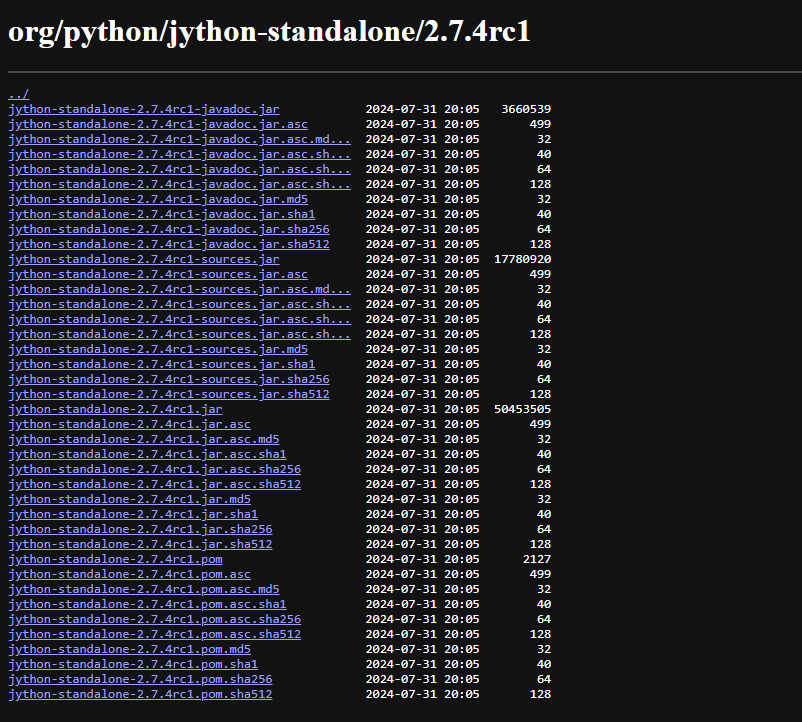
- Access Burp Settings: Launch Burp Suite, click the gear icon in the top right, or navigate directly to Settings in the main menu bar.
- Set Environment Paths: In the settings sidebar, expand the Extensions category and select Python Environment (or Ruby Environment).
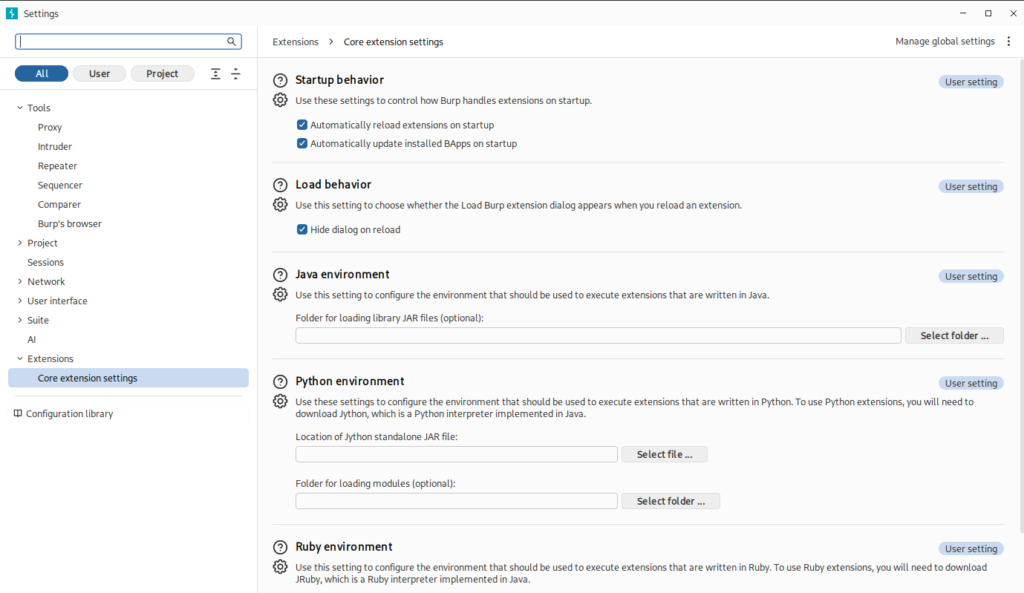
- Link the JAR File: Under Location of Jython standalone JAR file, click Select file, browse your local disk, and select the downloaded
.jarfile. Burp will instantly bind the environment without requiring a restart.
- Access the BApp Store: Navigating Burp’s central extension repository. PortSwigger maintains a curated store featuring hundreds of community and enterprise extensions that have been vetted for stability and performance.
- Open Burp Suite and locate the main top navigation bar.
- Click on the Extensions tab to open the extension manager workspace.
- Select the BApp Store sub-tab. You will see a complete, searchable directory of available add-ons alongside details like author, rating, and modern Montoya API compatibility.
- Search and Select the Extension: Filter, evaluate, and inspect extension capabilities. Finding the exact tool for your specific penetration testing objective is simple with built-in search and filtering tools.
- Locate the Plugin: Use the search bar in the top-left corner of the BApp Store panel to search by extension name (e.g., Autorize, Param Miner, or Turbo Intruder) or by target vulnerability category.
- Inspect Requirements: Click on the extension to view its description panel. Review its features, user feedback, memory requirements, and whether it requires a Burp Suite Professional license or specific runtime dependencies.
- Install or Load the Add-on: Automatic compilation, execution, and manually loading custom extensions. Once you have selected your desired extension, the final setup step brings it into your active workflow.
- Standard BApp Installation: Click the Install button located in the bottom-right details panel. Burp Suite will automatically download the source files, compile them in memory, and initialize the plugin.
- Verify Installation: Switch to the Installed sub-tab. Active extensions will show a checked Loaded box, and any customized user interface elements (such as dedicated top-level tabs) will appear immediately in your Burp Suite window.
- Manual Installation (Offline/Custom Extensions): If you are developing a custom extension or installing a standalone file (
.jar,.py, or.rb) obtained directly from GitHub, navigate to the Installed tab, click Add, select the extension type/file path, and manually click Next to load it.
Top 10 Add-ons for Burp Suite in Web Security
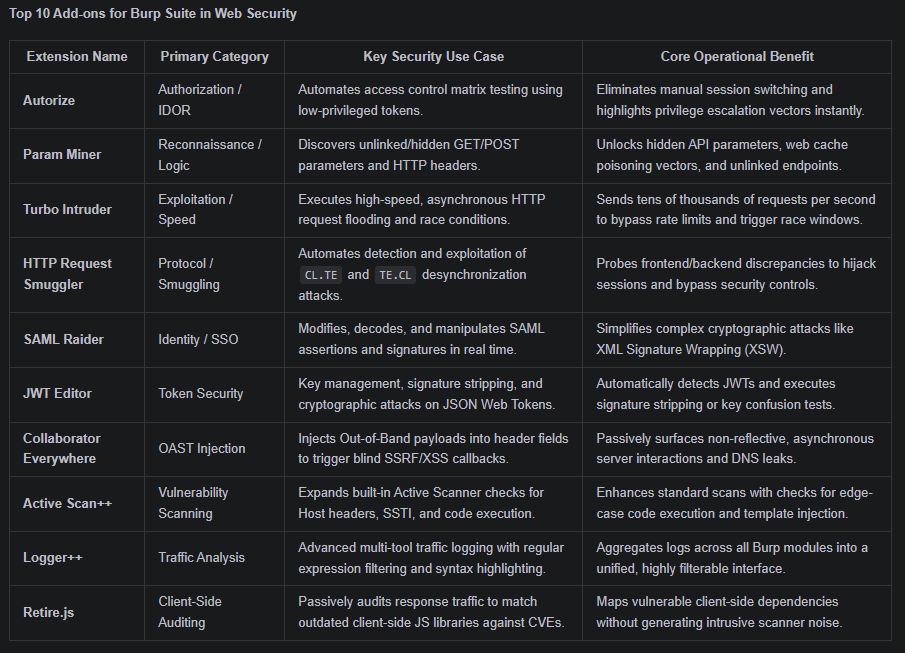
1. Autorize
Autorize is an indispensable extension for detecting broken access control, authorization bypasses, and Insecure Direct Object Reference (IDOR) vulnerabilities across multi-role web applications. Manual authorization testing traditionally requires intercepting traffic, replacing session cookies, and replaying requests across different user roles—a process that is time-consuming and prone to human error. To automate this, testers configure Autorize with the authorization headers of a low-privileged user (and optionally an unauthenticated user). As the security researcher navigates the application using an administrative account, Autorize transparently repeats every intercepted request in the background using the lower-privileged credentials, comparing response status codes and message lengths to highlight endpoints where access controls are missing or bypassed.

2. Param Miner
Developed by PortSwigger Research, Param Miner is a high-speed discovery tool built to unearth hidden, unlinked, or unadvertised HTTP parameters. Web applications frequently accept debug flags, administrative switches, or non-standard headers that are absent from front-end code, leaving them exposed to logic flaws and cache manipulation. The extension utilizes optimized, asynchronous guessing algorithms to test thousands of potential GET/POST parameters and HTTP headers against target endpoints. By monitoring subtle variations in server responses—such as small changes in content length, status codes, or header reflections—Param Miner effectively uncovers Web Cache Poisoning vectors, unintended header processing (e.g., X-Forwarded-Host), and secret administrative parameters.

3. Turbo Intruder
Designed for high-performance HTTP request generation, Turbo Intruder is an extension that complements Burp Suite’s native Intruder. Standard Intruder threads are often bounded by GUI processing overhead and standard HTTP stacks, making them unsuitable for time-sensitive, high-volume, or single-packet attacks. Built on an asynchronous HTTP stack written in C/Python, Turbo Intruder can transmit tens of thousands of requests per second with minimal CPU and memory footprints. Testers write custom Python scripts to manage attack logic, making it the industry standard for executing single-packet race condition attacks (such as double-spending or multi-use promo codes), high-speed brute-forcing, and rate-limit evasion mechanisms.
4. HTTP Request Smuggler
HTTP Request Smuggler is the premier extension for detecting, analyzing, and exploiting HTTP Request Smuggling desynchronization vulnerabilities. These vulnerabilities occur when frontend reverse proxies and backend application servers parse HTTP request boundaries (Content-Length vs. Transfer-Encoding) differently, allowing an attacker to “smuggle” a hidden request into the backend pipeline. The extension automatically scans target servers for CL.TE, TE.CL, and HTTP/2 downgrade desynchronization flaws by crafting precise, non-destructive probe payloads. Once identified, it provides an integrated interface with pre-built exploit templates designed to hijack secondary user sessions, bypass frontend security controls, access internal management endpoints, or poison web caches.
5. SAML Raider
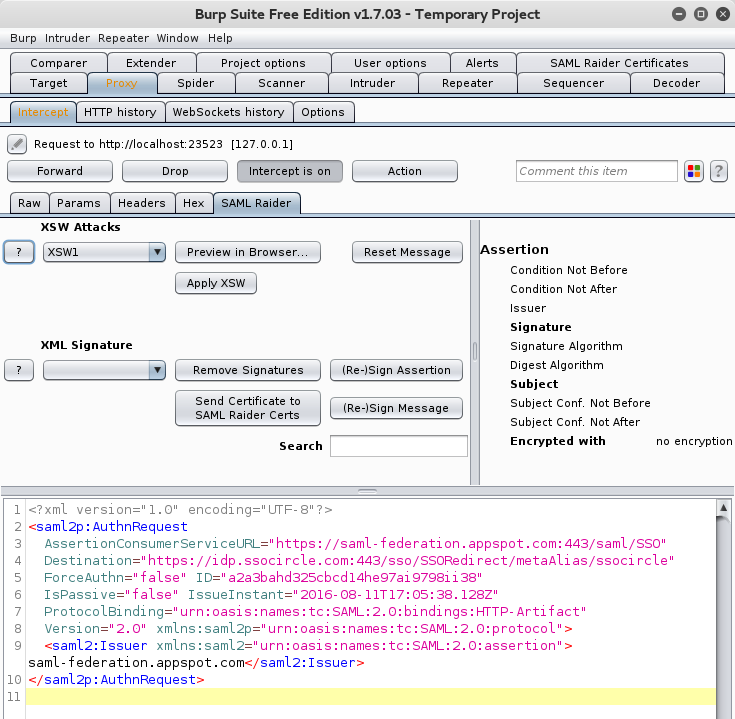
SAML Raider is a dedicated toolkit engineered for testing Single Sign-On (SSO) infrastructures that rely on Security Assertion Markup Language (SAML). Modern enterprise environments heavily utilize SAML for federated authentication, but manual inspection and cryptographic manipulation of raw, base64-encoded XML assertions can be tedious. SAML Raider adds a dedicated tab to Burp’s Proxy and Repeater tools whenever a SAML message is detected in the traffic stream. It automatically decodes and formats the XML body, granting security testers instant access to modify assertions, attributes, and NameIDs while offering built-in shortcuts to execute complex cryptographic attacks like SAML Signature Wrapping (XSW), certificate spoofing, signature stripping, and XML External Entity (XXE) injection.
6. JWT Editor
JSON Web Tokens (JWTs) are widely used for session management and API authorization. The JWT Editor extension simplifies auditing web applications that utilize JWTs by providing a dedicated suite for decoding, editing, re-signing, and attacking token implementations. The extension automatically detects JWT strings within HTTP headers, request bodies, and cookies across all Burp tools. It incorporates an integrated key store management system, allowing testers to import public/private keys or generate HMAC secrets. With built-in attack modules, researchers can perform automated signature stripping ("alg": "none" attacks), execute HMAC key confusion attacks (switching public key algorithms from RSA to HMAC), and run dictionary attacks to brute-force weak signing keys.

7. Collaborator Everywhere
Collaborator Everywhere extends Burp Suite Professional’s native Out-of-Band Application Security Testing (OAST) capabilities across ambient network traffic. While manual testing often involves manually inserting Burp Collaborator links into specific input fields, many application backends process headers asynchronously behind internal queues and logging pipelines. Collaborator Everywhere runs passively in the background, injecting uniquely tracked Burp Collaborator domain payloads into common HTTP request headers (such as User-Agent, Referer, X-Forwarded-For, Client-IP, and True-Client-IP). If a backend application, logging server, or analytics pipeline processes these headers asynchronously and initiates an external connection, the extension logs an alert highlighting blind SSRF, DNS resolution leaks, or Pingback vulnerabilities.

8. Active Scan++
Active Scan++ acts as an add-on scanner module designed to expand the coverage of Burp Suite Professional’s built-in Active Scanner. It focuses on identifying subtle, complex vulnerability classes that require specialized payload structures and advanced heuristic checks. Operating seamlessly during active scans, Active Scan++ executes lightweight, high-probability probes designed to flag edge-case vulnerabilities with minimal false positives. It specifically tests for Server-Side Template Injection (SSTI) across multiple template engines, Host header injection, edge-side includes (ESI) processing flaws, asynchronous code evaluation, and obscure remote code execution (RCE) vectors.

9. Logger++
While Burp Suite provides an HTTP history tab, it is restricted to proxy traffic and lacks advanced multi-stage filtering capabilities. Logger++ bridges this gap by logging all requests and responses generated across every Burp module—including Proxy, Intruder, Scanner, Repeater, and custom third-party extensions—into a single centralized database. Logger++ logs traffic in real time and provides a highly customizable, multi-column viewing interface. Penetration testers can construct complex regular expression (Regex) filters, color-code specific status responses, search across request/response pairs, and analyze complete traffic timelines to ensure that automated checks or extension-generated traffic can be fully audited and exported for client documentation.
10. Retire.js
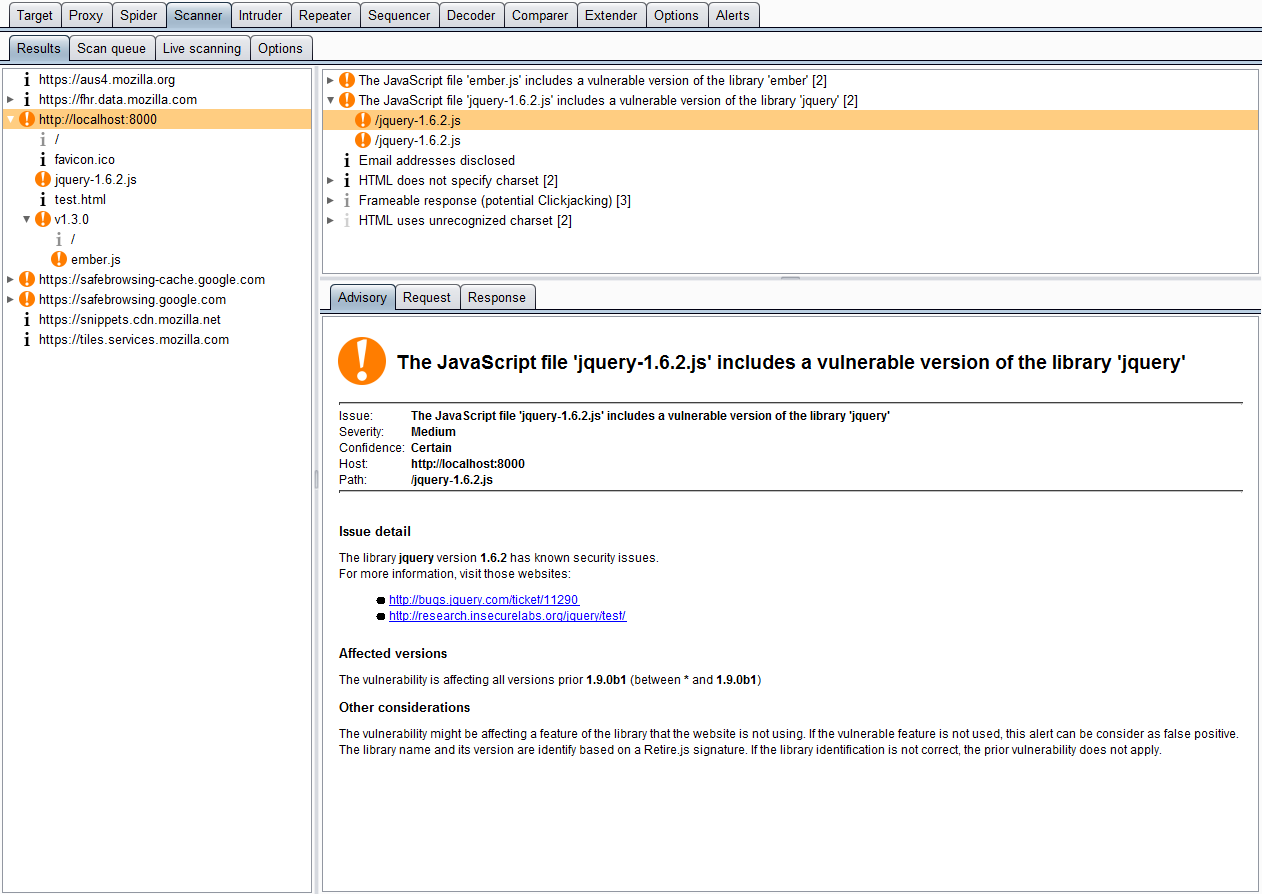
Modern web applications rely heavily on client-side JavaScript frameworks and open-source libraries. Outdated client-side dependencies often contain publicly documented vulnerabilities (CVEs) that allow attackers to execute Cross-Site Scripting (XSS) or prototype pollution attacks. Operating purely as a passive analyzer, Retire.js continuously monitors incoming HTTP responses for JavaScript files, inline scripts, and library signatures. It compares detected library versions against a continuously updated vulnerability database. When a match is identified, it generates an issue entry detailing the outdated dependency, its exact version, associated CVE IDs, and direct links to public advisory notes.
Conclusion
Extending Burp Suite using targeted add-ons significantly elevates the depth, precision, and efficiency of web application penetration testing. While the native suite provides an exceptionally strong foundation for standard traffic analysis and vulnerability identification, relying solely on core functionalities leaves critical gaps when auditing complex modern web targets. Extensions bridge these gaps by adapting the platform to handle non-standard authentication mechanisms, binary data formats, and intricate frontend/backend architectures. Integrating specialized tools like Autorize for access control automation, Turbo Intruder for high-speed concurrency attacks, and Param Miner for unlinked parameter discovery completely shifts a security assessment from reactive manual testing to proactive, intelligent automation. These add-ons empower penetration testers to surface deep logic flaws, subtle race conditions, and hidden entry points that standard automated scanners routinely overlook, saving countless hours during time-constrained security engagements. Beyond immediate performance gains, maintaining a curated library of BApps ensures that security professionals stay ahead of the rapidly evolving threat landscape. Community-driven extensions rapidly incorporate research on novel attack surfaces—such as HTTP Request Smuggling variants, SAML signature wrapping, and JWT cryptographic flaws—giving security teams instant access to cutting-edge research methodologies without waiting for framework-level core updates.
Ultimately, mastering the extension ecosystem transforms Burp Suite from a standard interception proxy into a fully customized, high-powered security auditing framework. By properly configuring runtime dependencies like Jython and systematically deploying top-tier extensions across proxy, scanning, and exploitation phases, security researchers can deliver thorough, rigorous, and highly effective web application assessments.
As someone who has been using Burp Suite for years, I sometimes wonder if it is necessary to buy the pro version, because to use most of these plugins, you need to buy the pro version.