
Introduction
SSH (Secure Shell) tunneling and port forwarding have become indispensable tools for system administrators, cybersecurity professionals, and developers worldwide. In an era where network security threats continuously evolve and data breaches occur with alarming frequency, the ability to create secure encrypted channels for data transmission has never been more critical. SSH tunneling transforms the ubiquitous SSH protocol from a simple remote access utility into a sophisticated security mechanism capable of protecting sensitive network traffic, enabling access to restricted resources, and facilitating secure communication across potentially hostile networks.
This comprehensive guide explores the multifaceted aspects of SSH tunneling and port forwarding, providing both theoretical understanding and practical implementation guidance. Whether you’re managing distributed infrastructure, conducting penetration tests, securing remote access, or architecting secure cloud environments, mastering these techniques will significantly enhance your ability to operate securely in modern network environments.
Learning Objectives
By completing this comprehensive guide, you will achieve the following learning objectives:
- Understand the fundamental concepts behind SSH tunneling and port forwarding mechanisms, including how encryption protects transmitted data across networks
- Differentiate between local, remote, and dynamic port forwarding techniques, recognizing appropriate use cases for each method
- Implement all three primary SSH tunneling types with proper syntax and configuration options for diverse real-world scenarios
- Apply SSH security best practices encompassing server hardening, access controls, and monitoring strategies to prevent misuse
- Utilize SSH configuration files effectively to streamline connections, enhance productivity, and maintain security across multiple systems
- Leverage specialized tools like Chisel and SSHuttle for advanced penetration testing and network access scenarios
- Apply SSH escape sequences and advanced options to troubleshoot connections and manage tunnels dynamically
What is SSH Tunneling and Port Forwarding?
SSH tunneling, also referred to as SSH port forwarding, is a method of creating secure encrypted connections between local and remote machines by establishing protected pathways through which network traffic can safely travel. The fundamental principle underlying SSH tunneling is remarkably elegant: any traffic traveling through an SSH connection becomes encrypted, protected from eavesdropping, man-in-the-middle attacks, and other network-based threats that might compromise data on untrusted networks. When you establish an SSH tunnel, you’re essentially creating a secure conduit that intercepts network traffic destined for a specific port on your local machine and forwards that traffic through an encrypted SSH connection to a remote server, which then delivers the traffic to its final destination. To external observers monitoring network traffic, the data appears as encrypted SSH protocol packets, completely obscuring the actual content and purpose of the communication. This transparency combined with robust encryption makes SSH tunneling an exceptionally powerful security mechanism.
The technical sophistication underlying SSH tunneling conceals a straightforward operational model. SSH tunneling encapsulates TCP/IP packets within SSH protocol frames, creating nested communication where the outer SSH layer provides encryption while the inner payload can be any TCP-based protocol—HTTP, HTTPS, database protocols, remote desktop protocols, or any other TCP service. This protocol-agnostic approach enables SSH tunneling to secure virtually any network communication occurring over TCP connections. Port forwarding, the mechanism enabling SSH tunneling, leverages SSH’s built-in capability to establish forwarded connections as negotiated channels within the main SSH session. These forwarded channels operate transparently to the applications using them, appearing as direct connections while actually being securely encrypted and transmitted through the SSH tunnel.
How SSH Tunneling and Port Forwarding Works?
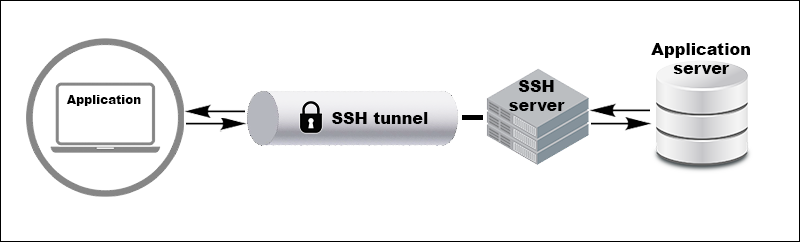
Understanding SSH tunneling and port forwarding requires a closer look at the layered network architecture and the secure data flow established by SSH. At its core, SSH tunneling operates by wrapping application-layer protocols such as HTTP, RDP, or MySQL inside encrypted SSH connections. Ordinarily, these protocols transmit data openly over the network, leaving information exposed to interception, snooping, or manipulation. By introducing an encrypted SSH tunnel, the client securely re-routes traffic bound for a local port into a protected channel. The SSH server on the remote end then decrypts the incoming data and delivers it to the final destination application. As a result, the destination perceives all traffic as originating from the remote server, not the original client, thus cloaking the real source and ensuring confidentiality.
The actual setup process involves a series of orchestrated steps. First, the SSH client connects to the SSH server using authentication, such as a password or cryptographic key. Once the secure session is established, the client opens forwarding channel requests within this session, specifying which local port to monitor and what remote resource to target. For local port forwarding, the SSH server prepares to route traffic accordingly, listening on the designated port and forming a secure channel. When applications on the client machine connect to the forwarded local port, SSH accepts the connection and generates a new encrypted channel. The data sent from applications travels through this channel, reaching the SSH server, which decrypts and relays it onward to the final target service or device. Any response from the remote side returns along the same tunnel, guaranteeing secure two-way communication.
Throughout these steps, robust cryptographic mechanisms — such as AES for data encryption, RSA or ECDSA for key exchange, and HMAC for data integrity — keep all traffic confidential and authenticated. The security posture also relies on proper implementation and configuration: strong, key-based authentication vastly outperforms passwords; strict SSH server settings can limit tunneling to authorized users and destinations. By maintaining full-duplex (bidirectional) channels, SSH tunneling supports interactive shells and real-time applications, so keyboard input and remote output can flow seamlessly and securely. This makes SSH port forwarding ideal for safe system administration, database access, private cloud management, or remote desktop operations.
The Main Steps of SSH Tunneling:
- The SSH client starts a secure session with the server using password or key-based authentication.
- Forwarding requests are submitted during the session, defining tunnel type and which local port the client will listen on.
- The SSH server creates and manages the forwarded connection, opening a listening port or proxy as specified.
- When a local application sends data to the forwarded port, SSH encrypts this traffic and delivers it through the tunnel to the remote server.
- The SSH server decrypts the data, passes it along to the target service, and sends any response securely back through the same channel, maintaining two-way encryption and integrity.
This mechanism streamlines secure network access, shields sensitive data from threats, and provides a versatile foundation for secure remote communications and administration.
SSH Tunneling and Port Forwarding Techniques
SSH supports three primary tunneling methods, each optimized for different scenarios and network architectures. Understanding when and how to deploy each technique represents essential knowledge for effectively utilizing SSH’s security capabilities.
Local Port Forwarding
Local port forwarding represents the most commonly encountered SSH tunneling technique, enabling you to access remote services as though they were running directly on your local machine. This method proves invaluable for accessing databases, web applications, and other services restricted to internal networks from external locations.
The command syntax for local port forwarding follows this pattern
ssh -L local_port:destination_server:remote_port user@ssh_serverBreaking down this command:
-Lflag activates local port forwardinglocal_portspecifies which port on your local machine should listen for incoming connectionsdestination_serverindicates the target service’s hostname or IP address (as seen from the SSH server)remote_portidentifies which port the destination service listens onuser@ssh_serverspecifies authentication credentials and the SSH server address
A practical example demonstrates local port forwarding’s utility. Suppose you need to administer a MySQL database server that only accepts connections from within the company network, but you’re working remotely:
ssh -L 3306:db.company.internal:3306 admin@bastion.company.comThis command establishes a local listening socket on port 3306 of your machine. When you connect your database client to localhost:3306, the connection routes through the encrypted tunnel to the bastion host, which forwards your traffic to the internal database server on port 3306. To external network observers, they see only encrypted SSH traffic between your machine and the bastion host, never revealing the actual database communication.
Multiple local port forwards can be established simultaneously within a single SSH session by specifying multiple -L options:
ssh -L 3306:db.company.internal:3306 -L 5432:postgres.internal:5432 admin@bastion.company.comThis configuration enables simultaneous access to multiple internal services through a single SSH connection, improving efficiency and reducing connection overhead.
Remote Port Forwarding
Remote port forwarding operates in the opposite direction from local forwarding, enabling a remote server to access services running on your local machine. This technique proves essential when you need to expose local services to remote networks without making those services directly publicly accessible.
The command syntax for remote port forwarding is:
ssh -R remote_port:localhost:local_port user@ssh_serverWhere:
-Rflag activates remote port forwardingremote_portdesignates which port on the remote SSH server should listen for connectionslocalhost:local_portspecifies that connections should be forwarded to your local machine on the designated portuser@ssh_serveridentifies the SSH server and authentication credentials
Remote port forwarding particularly benefits developers testing webhook integrations where external services need to send callbacks to a local development environment. For example, if you’re developing a payment processing integration requiring webhook callbacks and you’re testing locally
ssh -R 0.0.0.0:8080:localhost:3000 deploy@my-server.comThis configuration instructs the remote server to listen on port 8080 (accessible from anywhere on the internet thanks to 0.0.0.0) and forward all arriving connections back to your local machine on port 3000 where your development application is running. External payment services can now send webhooks to my-server.com:8080, and these webhooks are securely tunneled back to your local development environment for testing.
A critical configuration requirement for remote port forwarding to function properly involves modifying the SSH server’s configuration file (/etc/ssh/sshd_config). By default, SSH servers bind forwarded ports only to localhost (127.0.0.1) for security reasons, preventing external systems from accessing the tunnel. To allow external access, the server administrator must add
GatewayPorts yesAlternatively, for more granular control allowing external access only from specific addresses:
GatewayPorts clientspecifiedThis configuration option requires careful consideration due to security implications. Enabling GatewayPorts effectively exposes internal services through the SSH server to any network with connectivity to the server. Restrict this configuration to trusted users and monitor for misuse.
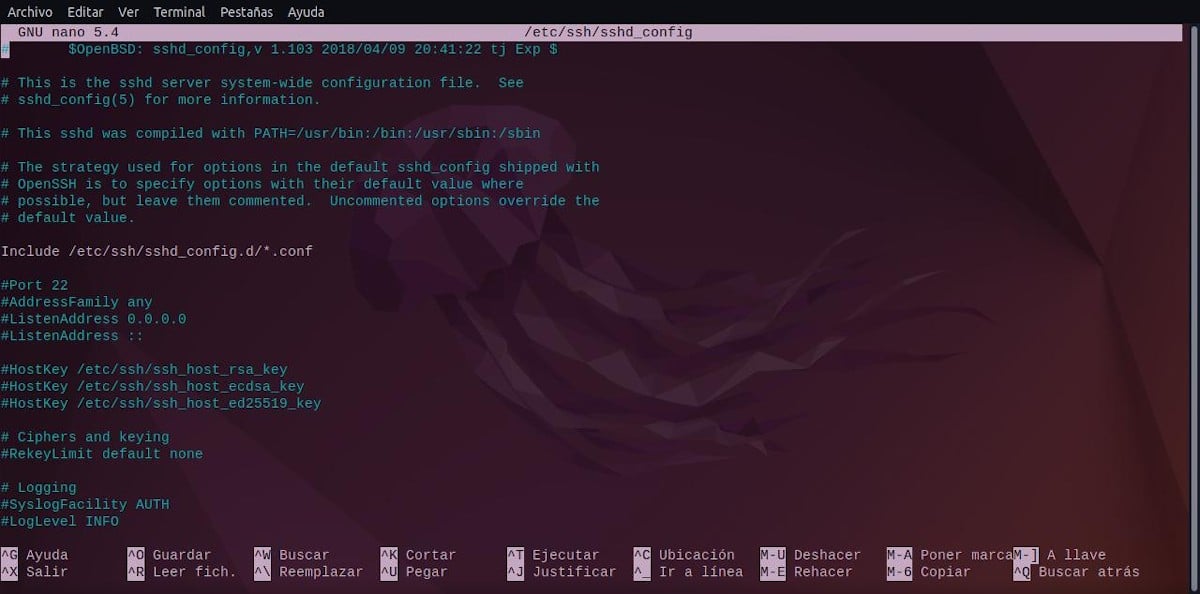
After modifying sshd_config, the SSH service must be restarted:
sudo systemctl restart sshdDynamic Port Forwarding
Dynamic port forwarding creates a SOCKS proxy server on your local machine that routes network traffic through the SSH connection, providing a flexible method for securing various types of traffic without requiring per-service configuration. Unlike local and remote forwarding where specific ports and destinations are predetermined, dynamic forwarding offers a general-purpose solution for redirecting network traffic based on runtime requirements.
The command for establishing dynamic port forwarding is:
ssh -D local_port user@ssh_serverWhere:
-Dflag activates dynamic port forwardinglocal_portspecifies which port on your local machine becomes the SOCKS proxy listening portuser@ssh_serveridentifies the SSH server and authentication credentials
For example, creating a SOCKS proxy on port 1080:
ssh -D 1080 user@my-remote-server.comOnce this tunnel is established, you can configure applications to use localhost:1080 as their SOCKS proxy. Any application supporting SOCKS proxy configuration—web browsers, penetration testing tools, or network utilities—can route all their traffic through this tunnel.
To use dynamic port forwarding with a web browser, access the browser’s proxy settings (the exact location varies by browser) and configure:
- SOCKS proxy:
localhost - Port:
1080
With this configuration, every HTTP request your browser makes flows through the SSH tunnel to the remote server, which performs DNS resolution and actually connects to the requested websites on your behalf. Your browser’s requests appear to originate from the remote server’s network, effectively placing you behind its network boundary for security and access purposes.
Dynamic port forwarding excels in penetration testing scenarios where security professionals need to access multiple services within a target network without configuring individual forwards for each service. A tester who has compromised an internal system can establish a dynamic tunnel through that compromised system, then use tools like Nmap with proxychains to scan additional internal networks
proxychains nmap -sT -sV 10.10.10.0/24This remarkable capability allows comprehensive network reconnaissance from a single compromised machine, explaining why dynamic port forwarding is extensively used during penetration tests and red team operations.
Advanced Tunneling Techniques
Beyond the three primary forwarding types, SSH provides advanced techniques for complex network scenarios.
SSH ProxyJump and Jump Hosts represent modern approaches to accessing systems behind multiple security layers. Previously, accessing a system protected by a bastion host required establishing sequential SSH connections manually. The ProxyJump feature, introduced in OpenSSH 7.3, streamlines this process significantly.
The basic ProxyJump command syntax is:
ssh -J user@jump_host user@target_hostThis single command instructs SSH to first establish a connection to the jump host, then automatically create a tunnel through that connection to reach the target host. Multiple intermediate hops can be chained together:
ssh -J user@jump1.example.com,user@jump2.example.com user@final-target.comFor frequently accessed systems, ProxyJump can be configured in the SSH configuration file (~/.ssh/config):
Host target-server
    HostName target.example.com
    User admin
ProxyJump bastion.example.comWith this configuration, simply executing ssh target-server automatically routes through the bastion host. This approach provides significant security benefits in cloud environments where bastion hosts serve as the sole entry point to private networks.
Reverse SSH Tunneling addresses scenarios where systems behind restrictive firewalls need to provide access to internal services. Firewalls often permit outgoing SSH connections while blocking incoming connections entirely. Reverse tunneling solves this by having the restricted system initiate an SSH connection with a reverse forward configured:
ssh -R 8000:localhost:80 user@external-serverThis command instructs the external server to listen on port 8000 and forward any arriving connections back through the SSH tunnel to port 80 on the internal machine. External systems can now access the internal service by connecting to external-server:8000.
For persistent reverse tunnels that automatically reconnect when network interruptions occur, the autossh utility provides automatic restart capabilities:
autossh -M 0 -N -o "ServerAliveInterval 30" -o "ServerAliveCountMax 3" -f -R 8000:localhost:80 user@external-serverSSH Multiplexing enables multiple SSH sessions to share a single TCP connection, dramatically improving performance and reducing authentication overhead. Configuring multiplexing in ~/.ssh/config:
Host *
    ControlMaster auto
    ControlPath ~/.ssh/sockets/%r@%h-%p
ControlPersist 10mWith multiplexing configured, subsequent connections to the same host establish nearly instantaneously by reusing the authenticated master connection rather than performing full SSH handshakes.
Conclusion
SSH tunneling and port forwarding represent essential techniques in modern network security, administration, and development. The ability to create secure encrypted channels for arbitrary network traffic provides powerful capabilities for protecting sensitive communication, accessing restricted resources, and maintaining security across distributed systems. The three primary SSH forwarding techniques—local, remote, and dynamic—address different scenarios and provide flexibility for diverse use cases. Local port forwarding enables secure access to internal services from external locations. Remote port forwarding allows restricted systems to expose services through external servers. Dynamic port forwarding creates SOCKS proxies for flexible, application-agnostic traffic routing.
Advanced techniques including ProxyJump, multiplexing, and reverse tunneling extend SSH’s capabilities to complex network architectures and specialized scenarios. These techniques, combined with alternative tools like Chisel and SSHuttle, provide comprehensive solutions for virtually any secure network access requirement. Successful SSH tunneling deployment requires balancing powerful functionality with appropriate security controls. SSH server hardening, careful forwarding configuration, and active monitoring for misuse protect organizations while enabling necessary remote access. Understanding when SSH tunneling provides optimal solutions compared to alternatives like VPNs ensures technology selection appropriate to specific requirements.
By mastering SSH tunneling and port forwarding techniques presented in this comprehensive guide, you gain powerful capabilities for securing network communication, administering distributed systems, and conducting sophisticated network operations. Whether you’re a system administrator securing remote access, a developer testing applications across networks, or a security professional conducting authorized penetration tests, SSH tunneling skills prove invaluable in modern infrastructure environments