
Introduction
Active Directory Federation Services (ADFS) is a foundational Microsoft technology offering secure single sign-on (SSO) and federated identity management across diverse environments. In today’s enterprise landscape, organizations routinely combine on-premises systems, cloud applications, third-party SaaS solutions, and even business partner resources—making complex identity challenges inevitable. ADFS addresses these challenges by allowing employees and partners to access multiple applications and services, both inside and outside the corporate boundary, using a unified set of credentials. Active Directory Federation Services security refers to the robust set of practices, configurations, and technologies employed to safeguard the servers, protocols, certificates, tokens, and trust relationships involved in this authentication process. This security layer is essential; ADFS acts as a gateway that verifies user identities and enforces access policies for critical business assets. Any vulnerability, misconfiguration, or weak trust could expose sensitive data, disrupt business operations, or damage reputation—especially as attackers increasingly target federated identity platforms as entry points for lateral movement and privilege escalation.
By leveraging claims-based access control, secure token exchange protocols (SAML, WS-Federation), and seamless integration with Active Directory, ADFS centralizes authentication and authorization. This centralization both enhances user experience—by lowering password fatigue and streamlining cross-platform access—and empowers IT teams with comprehensive oversight, auditing, and control of identity flows. Through careful ADFS security planning, organizations achieve not just regulatory compliance and reduced support costs, but also resilience against sophisticated threats targeting hybrid identity architectures in a rapidly evolving digital environment.
Learning Objectives
- Understand what ADFS is and why securing ADFS is crucial for modern organizations.
- Grasp how ADFS works at a high level, including its architectural components and authentication flows.
- Recognize key vulnerabilities and evolving threats targeting ADFS environments.
- Learn about advanced attack techniques such as token theft, Golden SAML, and federation trust abuse.
- Become familiar with proven strategies for ADFS backup, disaster recovery, and robust post-incident response.
What is Active Directory Federation Services (ADFS) Security
Active Directory Federation Services (ADFS) Security encompasses all the protection mechanisms applied to Microsoft’s ADFS platform, ensuring the integrity and confidentiality of federated identity management and single sign-on (SSO) processes across organizational boundaries and cloud services. ADFS acts as the trust bridge between internal users and external or cloud applications, granting access based on secure digital identities and claims. Security in this context means safeguarding not only the core ADFS servers, but also the tokens, certificates, configuration databases, and trust relationships that underlie every authentication exchange. ADFS security management starts with locking down federation infrastructure: restricting administrative access, hardening server configurations, isolating services in protected network segments, and using firewalls and proxies for external connectivity. The systems that issue, sign, and validate tokens must be fully patched, monitored, and equipped with intrusion detection—since any breach could let attackers forge identities, access confidential data, or escalate privileges throughout the enterprise. Protecting certificates (especially token-signing keys), managing access rights, and limiting permissions for Active Directory Federation Services securityand relying-party trusts are foundational steps.
Beyond technical hardening, ADFS security relies on robust operational controls. This includes detailed authorization claim rules, automated certificate management, continuous log monitoring, and prompt response to suspicious authentication patterns or policy changes. The trust relationships with business partners, clouds, and SaaS providers require careful review, with strict limits on shared identity information to minimize attack surfaces. Ultimately, ADFS security is about defending the heart of organizational authentication—allowing efficient, seamless access to resources while actively mitigating identity theft, replay attacks, or unauthorized privilege escalation. As cyber threats grow in sophistication, proper ADFS security planning ensures resilient business operations and regulatory compliance across both on-premises and hybrid cloud environments.
How Does Active Directory Federation Services Work
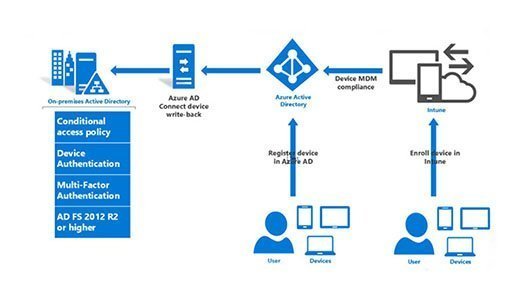
Active Directory Federation Services (ADFS) operates as a robust identity provider using a claims-based authentication model, designed to enable secure access across both internal and external applications. Its architecture interconnects critical components to facilitate smooth and reliable authentication for users regardless of their location or the resources they are trying to reach.
- Active Directory (AD): This core directory service is the backbone of the authentication process. AD keeps a comprehensive database of user credentials, attributes, and group memberships. When a user requests access to an application that relies on ADFS, their identity is first validated against AD using Windows-integrated protocols. AD’s role is to affirm the legitimacy of the user and supply claims—detailed assertions about identity, rights, or roles—that ADFS will reference when constructing security tokens.
- ADFS/Federation Server: The federation server is the heart of the ADFS ecosystem. It acts as the gateway for authentication, verifying users against AD and issuing digitally-signed security tokens that encapsulate claims. The server manages multiple authentication methods, supports multi-factor authentication, and orchestrates federation protocols (like SAML and WS-Federation) to ensure broad compatibility. Additionally, it is responsible for maintaining the configuration database where trust relationships, relying parties, and claims rules are stored.
- Security Token Service (STS): This is a specialized engine that manages token issuance. The STS receives authentication requests, builds tokens packed with claims, and ensures these tokens are valid for the requesting application or service. It cryptographically signs each token, which allows relying parties to trust its origin and integrity. The STS also mediates federation protocols, allowing integration between diverse identity providers and target applications.
- Web Application Proxy (WAP): Deployed in the DMZ or perimeter network, the WAP serves as a secure intermediary for authentication traffic. It forwards external requests to the federation server inside the protected network, thus shielding the ADFS infrastructure from direct exposure to the internet. The proxy filters and validates incoming requests, blocks illegitimate traffic, and ensures only authorized users reach the authentication engine.
- Relying Party (RP): These are the consuming applications or systems that depend on ADFS for authentication. A relying party accepts the security tokens from ADFS, parses the embedded claims, and decides on access rights or permissions based on them. This trust relationship means applications can securely rely on ADFS to validate users without ever seeing usernames or passwords directly, reducing risk and administrative overhead.
- Token-signing and -decrypting certificates: Security tokens are signed (and sometimes encrypted) using special certificates managed by ADFS. The token-signing certificate assures that only the federation server can issue legitimate tokens, while the token-decrypting certificate is used when tokens must be transmitted securely to sensitive or regulated applications. Relying parties use these certificates to verify each token’s authenticity and integrity, preventing tampering or replay attacks.
This comprehensive architecture allows organizations to create federated trust relationships with partners and cloud providers, extend on-premises identities to external resources, and centralize control over authentication and authorization in a way that is both secure and scalable. Proper configuration and maintenance of these components are fundamental to protecting the authentication flow, user privacy, and business assets.
The typical authentication flow is as follows:
- User initiates access to a federated application: This could be a cloud-based service, partner system, or even a line-of-business tool integrated with ADFS. The process usually starts when a user clicks a login link or tries to open an application requiring authentication through federation. For service provider (SP)-initiated flows, the user’s direct attempt to enter the resource prompts the redirection automatically.
- Application redirects the request to the ADFS server: Immediately, the target application recognizes it cannot authenticate the user directly and sends an authentication request to the ADFS server by redirecting the user’s browser. This redirect ensures all authentication logic and policies are enforced at the trusted identity gateway, not at the application itself.
- ADFS authenticates the user: The ADFS server validates the user’s credentials, either by querying the local Active Directory for username/password or leveraging external claims providers, such as an enterprise partner’s federation service. This process can incorporate integrated Windows Authentication, multi-factor authentication, device compliance checks, or any configured conditional access policies.
- ADFS issues a signed token containing user claims: Upon successful authentication, ADFS generates a cryptographically signed token. This token contains standardized claims—such as the user’s identity, roles, group membership, email, or custom attributes—based on organizational policy and the requirements of the requesting application. The token’s signature and integrity prevent tampering and fraudulent use.
- Token is passed to the target application: The user’s browser forwards the token to the relying party application (usually as part of a cookie or SAML assertion). The application validates the token’s signature and inspects embedded claims to determine permissions, roles, and access rights. If the claims match policy criteria, access is granted; otherwise, it is denied or limited according to business rules.
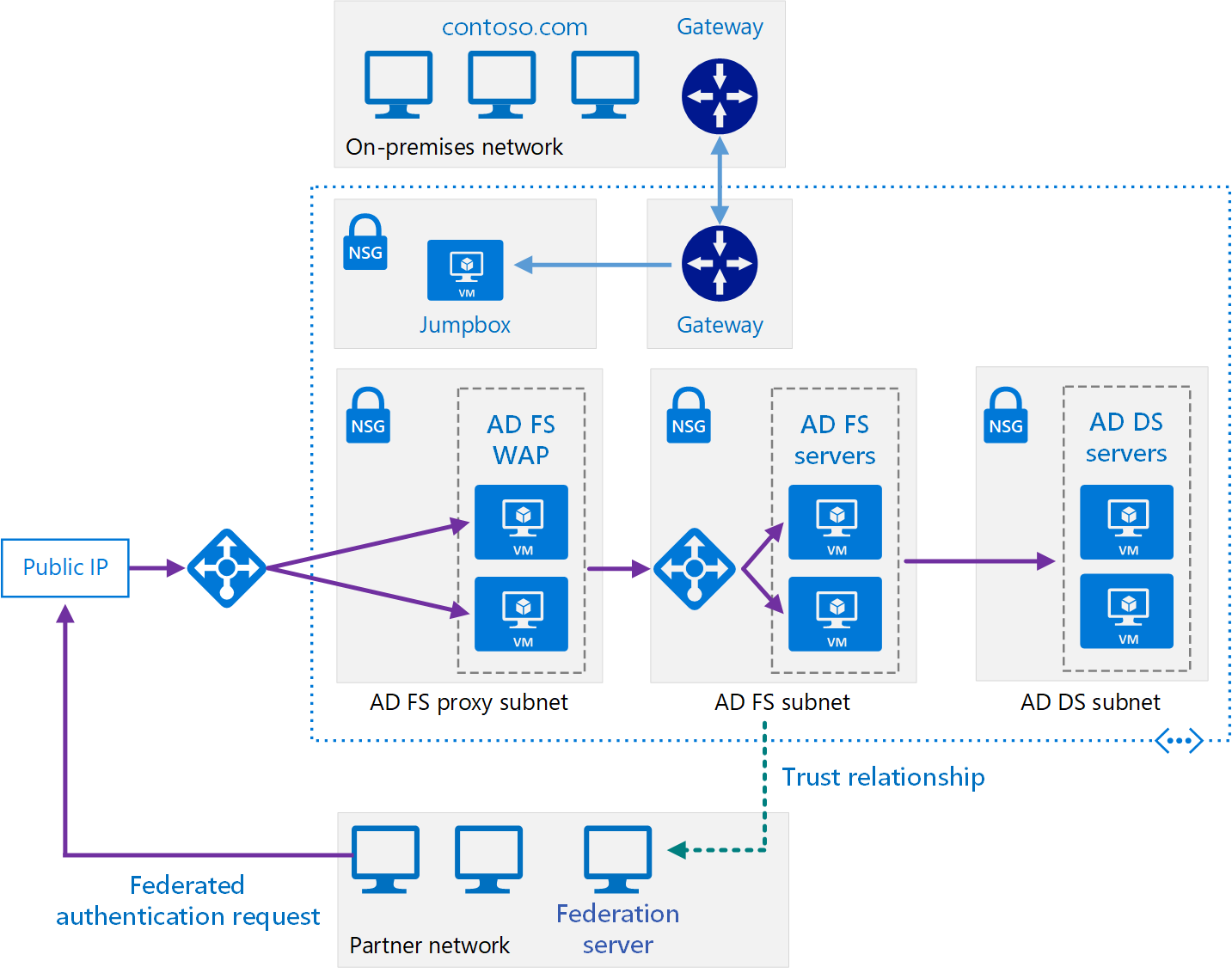
This approach enables organizations to offer seamless, secure access across business partners, cloud applications, and internal platforms without requiring users to maintain multiple sets of credentials or passwords. Federation trusts between organizations or providers ensure that authentication tokens are accepted and processed securely, allowing enterprise users to perform work efficiently in diverse environments while maintaining stringent security controls.
Critical Vulnerabilities and Recent Threats
ADFS is a high-value attack target due to its central role in federated authentication and authorization. Key vulnerabilities and recent threats have demonstrated the importance of vigilant monitoring and proactive patch management:
- CVE-2025-59258 – Information Disclosure via Log Files: ADFS servers affected by this vulnerability risk leaking sensitive information, including authentication tokens, private keys, and possibly personal data, through insecure diagnostic logs. Attackers with local access can read these logs and potentially impersonate users or escalate privileges within federated environments.
- CVE-2025-21193 – Federation Server Spoofing: This vulnerability allows attackers to impersonate ADFS servers at the network level, leading to full confidentiality compromise of federation tokens and user claims. Exploitation could let attackers forge tokens for arbitrary users or rely on stolen tokens to access cloud resources. No authentication is required for this spoofing attack, making it a major risk for unpatched servers exposed to public networks.
- Phishing and Multi-Factor Authentication (MFA) Bypass Attacks: ADFS redirection mechanisms and authentication flows are increasingly targeted by attacker-in-the-middle (AitM) tools like Evilginx. These operations intercept or replay authentication data after MFA challenge completion, enabling persistent access to cloud and SaaS accounts even when MFA is enforced. By orchestrating malicious redirects via phishing or ad-based campaigns, attackers can collect credentials and session cookies for high-value federated resources.
- Token-Signing Certificate Theft and Forgery: Attackers able to extract the token-signing certificate’s private key from an ADFS server gain extraordinary power—they can forge authentication tokens for any federated account or application. Such attacks are central to techniques like Golden SAML and have been used in major supply chain breaches. Certificate theft often relies on privilege escalation, misconfigured key permissions, or exploitation of server mismanagement. Once compromised, all trust relationships and access policies are defeated until certificates are replaced and trust re-established.
- NTLM and LDAP Relay Attacks against ADFS-integrated Domain Controllers: Active Directory environments supporting ADFS continue to face risks from NTLM relay and authentication bypass attacks. Recent vulnerabilities (such as CVE-2025-54918) let attackers escalate from regular domain user to SYSTEM by relaying valid authentication sequences across networked services. Robust mitigations, such as server signing, are required to prevent relay-based privilege escalation and the compromise of sensitive authentication infrastructure critical to ADFS operations.
Together, these risks highlight the necessity for immediate patching, strict key management, continuous logging, and advanced monitoring across every ADFS deployment—especially those supporting federated cloud and hybrid environments.
Advanced Attack Techniques
Attackers have grown increasingly sophisticated in targeting ADFS. Today’s adversaries employ a wide array of tactics, often chaining more than one method in a single campaign to bypass controls, evade logging, and persist within hybrid identity environments:
- Golden SAML Attacks: Threat actors with administrative privileges on an ADFS server can extract the sensitive token-signing certificate and its private key. This lets them forge arbitrary SAML tokens for any user, including highly privileged cloud or on-premises accounts, granting persistent and undetectable access to services like Office 365, AWS, and Azure. Golden SAML was notably used in large-scale attacks such as SolarWinds, with recovery often requiring complex certificate rotations and trust updates across all connected platforms.
- Replication Abuse and DCSync-style Attacks: Adversaries leverage legitimate replication protocols and the ADFS Policy Store Transfer Service to remotely harvest encrypted token-signing certificates or sensitive domain data. Using DCSync and related methods, attackers can extract password hashes and configuration artifacts with minimal logging—making detection and forensics particularly challenging. These attacks exploit inherent design weaknesses in AD and federation infrastructure.
- Reverse Proxy and Relay Attacks: Tools like Evilginx establish a man-in-the-middle (AitM) proxy, intercepting authentication traffic between users and ADFS. After successful multi-factor authentication, attackers capture valid session tokens and cookies, which allows them real-time access to cloud apps regardless of MFA enforcement. These advanced phishing kits often use convincing branding and URL obfuscation to trick targets into entering credentials on spoofed login portals.
- Misuse of Federation Trusts: When federation trusts are misconfigured or too permissive, attackers can abuse them to traverse organizational boundaries, escalate privileges, or inject unauthorized claims. Indirect access opportunities allow malicious actors to exploit trust paths not subject to primary oversight, making trust governance and partner relationships a crucial segment of identity defense.
- Kerberoasting and Service Account Abuse: Attackers request service tickets for privileged accounts and extract the encrypted password hash, which can then be cracked offline. This method targets weaknesses in service account password policies and ticket lifetimes, offering direct routes to privilege escalation if proper controls are absent.
- NTLM and LDAP Relay Attacks: Legacy Windows authentication protocols like NTLM remain a persistent target, especially in environments with hybrid cloud and federation setups. Attackers relay authentication to trick services into accepting malicious tokens, leading to unauthorized access, lateral movement, and escalation from regular user to domain admin.
- Password Spray and Brute Force Attacks: Unlike traditional brute force attacks, password spraying tries common passwords against large lists of usernames, often bypassing lockout controls. Attackers exploit weak passwords and stale accounts to gain domain foothold. Defenses such as smart lockout, auditing, and password protection features are essential yet frequently underutilized.
Modern attackers combine these techniques with credential harvesting tools (like BloodHound and Mimikatz), configuration reconnaissance, and privilege abuse to compromise identity infrastructure quickly and stealthily. Proactive monitoring, regular patching, and strict trust/privilege management remain critical for defending ADFS against these evolving threats.
Backup and Disaster Recovery
Protecting ADFS infrastructure requires a multi-layered approach to backup and disaster recovery—crucial for business continuity, regulatory compliance, and rapid restoration after incidents:
- AD FS Rapid Restore Tool: This purpose-built utility automates comprehensive backups of ADFS configurations, related service communication and token-signing certificates, authorization policies, federation and relying party trust settings. The tool enables fast redeployment to new servers or farms after compromise, misconfiguration, or hardware failure. Administrators can schedule regular encrypted backups for storage on filesystems or cloud repositories, streamlining disaster recovery procedures and supporting forensic investigations after breaches.
- Certificate Management and Renewal: Token-signing and token-decrypting certificates are the backbone of secure token issuance and validation. Implementing automated certificate rollover ensures new certificates are generated and published in advance of expirations—reducing risks of authentication outages. For high-security environments, manual renewal processes with strict procedural documentation and partner coordination are advisable to prevent service disruptions and maintain trust with relying parties.
- Redundancy, High Availability, and Load Balancing: ADFS should be deployed within clustered server farms, with multiple federation servers and DMZ-based Web Application Proxy nodes distributed across primary and disaster recovery sites. Utilizing load balancers and, where feasible, SQL Always On for backend databases ensures fault tolerance and minimizes downtime. For multi-site DR, careful attention to replication latency, failover design, and cross-site trust configuration is required to guarantee seamless service availability in crisis scenarios.
- Regular Testing and Plan Auditing: Disaster recovery protocols are only effective if thoroughly tested and audited in controlled simulations. Frequent drills, documentation reviews, and “fire drill” enactments with step-by-step guides help validate the integrity of backups, the accuracy of recovery tasks, and the readiness of IT teams. Involving external team members (who did not write the plan) in testing uncovers gaps, ensures clarity, and fosters a culture of preparedness.
- Comprehensive Documentation and Dependency Mapping: Maintain detailed records of backup schedules, certificate lifecycles, server configurations, and all dependencies—such as authentication flows or integrated applications—within your recovery plan. Maps of service relationships and stepwise guides for varied disaster scenarios (including physical site loss, ransomware, or schema corruption) help orchestrate swift and correct action during high-stress recovery, reducing risk of data loss or extended outages, Active Directory Federation Services.
Implementing these best practices fortifies ADFS environments against data loss, configuration drift, and advanced threats—safeguarding authentication processes and supporting resilient, compliant operations in the face of evolving disaster scenarios.
Practical Example: Taking an ADFS Backup with Rapid Restore Tool
To illustrate, here is a hands-on walkthrough for backing up your ADFS configuration and keys using the AD FS Rapid Restore Tool. This ensures you have a secure copy of all essential authentication assets to expedite recovery or incident response.
Step-by-step:
- Install the Rapid Restore Tool: Download the tool from Microsoft or a trusted repository and ensure it’s executed with administrative privileges on your ADFS server.
- Open PowerShell as Administrator and run the following backup command (replace paths and password with your own):
Backup-ADFS
  -StorageType "FileSystem"
  -StoragePath "C:\ADFSBackup\"
  -EncryptionPassword "ComplexPassw0rd!"
  -BackupComment "Weekly scheduled backup"
-BackupDKM-StoragePath: Directory where the backup file will be saved.-EncryptionPassword: Protects the backup archive. Use a strong, unique password.-BackupComment: (Optional) Notes to help identify this backup.-BackupDKM: Ensures Distributed Key Manager keys are included.
- Verify the Backup: Confirm that the backup archive (encrypted) is present at your chosen location and test restoration procedures on a non-production system at regular intervals.
- Store Backups Securely: Transfer off-server (offline, cloud, or secure share) to prevent loss in case of local compromise or hardware failure.
By regularly following these steps—with up-to-date procedural documentation—organizations can assure ADFS recoverability, swift incident response, and compliance with internal security policies or external audit requirements.
Conclusion
Active Directory Federation Services security plays a foundational role in protecting enterprise authentication, ensuring that trust and access rights are seamlessly and securely extended beyond traditional network boundaries. As attack techniques and identity-based threats become more sophisticated, relying on default configurations or ad hoc Active Directory Federation Services securityisn’t sufficient—proactive, disciplined defense is essential. Organizations must enforce multi-factor authentication, apply the principle of least privilege, rigorously monitor and audit ADFS activity, and maintain strict control over certificates and federation trusts to reduce the risk of Active Directory Federation Services privilege escalation and unauthorized access. Hardening ADFS infrastructure requires more than technical controls: regular patching, comprehensive role-based access policies, and continuous review of Active Directory Federation Services securitybaselines must be standard practice. Effective monitoring and integration with SIEM solutions enable rapid detection and response to emerging threats, while strong operational controls—such as regular certificate renewals and disaster recovery testing—help ensure that authentication services remain resilient even in the face of incidents or outages.
Ultimately, securing ADFS is about safeguarding the gateway to all federated applications, partners, and clouds. By following best practices, embracing a layered defense approach, and staying vigilant about new vulnerabilities and advanced attack methods, security professionals can meaningfully reduce the risks to their organizations, protecting both data and reputation across the hybrid digital enterprise.